How to Create Moody Lighting That Feels Like a Movie Scene
Cinematic Portrait AI Prompt: How to Create Moody Lighting That Feels Like a Movie Scene
There’s a specific feeling you get when you look at a truly cinematic portrait. It doesn’t just show a face — it tells a story. You can almost imagine the moment before and after the image, like a paused frame from a powerful film. That emotional pull is exactly why cinematic portrait AI prompts with moody lighting have become so popular. And the good news? You don’t need a film studio or years of photography experience. You just need to know how to guide the AI correctly.
In this guide, you’ll learn how to write cinematic portrait prompts that produce deep shadows, dramatic lighting, and emotional impact — consistently.
What Makes a Portrait Cinematic?
A cinematic portrait goes beyond technical sharpness. It’s about atmosphere, emotion, and intention. When you describe a scene cinematically, you’re thinking like a director, not just a photographer.
A cinematic portrait usually includes:
- Controlled lighting with strong contrast
- Shadows that add mystery, not confusion
- A clear emotional tone
- Camera language inspired by film
- A story hinted at, not fully explained
When you combine these elements in a cinematic portrait AI prompt, the result feels immersive rather than artificial.
Understanding Moody Lighting in Cinematic Portraits
What Is Moody Lighting?
Moody lighting is a form of low-key lighting where shadows play a leading role. Instead of lighting everything evenly, you allow darkness to exist — sometimes even dominate.
Key characteristics include:
- Deep shadows and limited highlights
- Directional light from one main source
- Reduced brightness with intentional contrast
- Emotional undertones like mystery, tension, or intimacy
Moody lighting works especially well in portraits because it draws attention to the eyes, facial structure, and expression.
Why Moody Lighting Feels Cinematic
In cinema, lighting is used to express emotion without dialogue. A single light from the side can suggest conflict. Soft window light can feel nostalgic. Hard shadows can signal danger or strength.
When you use moody lighting in AI-generated portraits, you tap into the same visual language movies use — and that’s what makes the image feel believable and powerful.
The Core Elements of a Cinematic Portrait AI Prompt
To get consistent results, your prompt needs structure. A strong cinematic portrait prompt with moody lighting includes the following components:
- Subject: Who is in the portrait and what they’re doing
- Emotion: The feeling you want the viewer to experience
- Lighting: Direction, intensity, and style
- Camera Details: Lens, depth of field, focus
- Atmosphere: Environment, textures, or effects
- Style: Cinematic references or film-inspired language
Skipping one of these often leads to flat or generic results.
How to Write a Cinematic Portrait Prompt With Moody Lighting
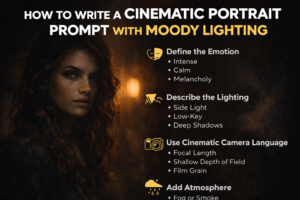
Step 1: Define the Emotional Core
Before you describe lighting or camera settings, decide how you want the portrait to feel.
Ask yourself:
- Is the subject calm, tense, reflective, or intense?
- Are they confident or vulnerable?
- Is the mood dark, melancholic, or dramatic?
Use emotional language directly in your prompt, such as brooding expression, quiet intensity, or soft melancholy.
Step 2: Be Precise With Lighting
Lighting is the heart of a cinematic portrait. Vague terms lead to average results, so be specific.
Effective lighting descriptions include:
- Side lighting with deep shadows
- Low-key lighting, high contrast
- Soft window light from one direction
- Rim light outlining the subject
- Single light source in a dark environment
Avoid generic phrases like good lighting. Instead, describe how the light behaves.
Step 3: Use Cinematic Camera Language
AI responds well to photography and film terminology. Including camera details helps shape the final image.
Common cinematic camera cues:
- 50mm or 85mm lens
- Shallow depth of field
- Soft background blur
- Film grain texture
- Cinematic framing
These details signal realism and help the AI avoid a plastic or overprocessed look.
Step 4: Add Atmosphere and Texture
Atmosphere makes the portrait feel alive. Small details can dramatically improve realism.
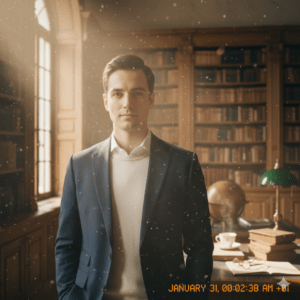
You can include:
- Subtle fog or smoke
- Dust particles in light beams
- Rain or moisture in the air
- Textured backgrounds
- Muted or desaturated color tones
These elements enhance the cinematic mood without overpowering the subject.
Cinematic Portrait Prompt Recipes (Quick Reference Table)
| Style | Subject | Lighting | Camera | Mood |
|---|---|---|---|---|
| Noir Portrait | Serious male subject | Hard side light, deep shadows | 50mm lens | Dark, dramatic |
| Emotional Close-Up | Woman with soft gaze | Window light, low contrast | 85mm lens | Intimate |
| Urban Cinematic | Street portrait | Neon rim lighting | Shallow DOF | Mysterious |
| Vintage Film Look | Classic portrait | Soft directional light | Film grain | Nostalgic |
You can mix and match these elements to create endless variations.
Example Cinematic Portrait AI Prompt (Moody Lighting)
Here’s a practical example you can adapt:
Cinematic portrait of a man in his early 30s, intense gaze, half-lit face, low-key moody lighting from the side, deep shadows, dramatic contrast, 85mm lens, shallow depth of field, subtle film grain, dark muted color palette, cinematic framing, emotional atmosphere
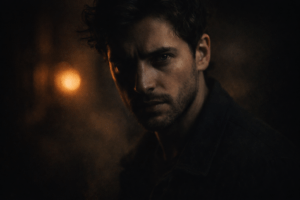
Notice how the prompt clearly defines emotion, lighting, and camera style without unnecessary clutter.
Common Mistakes to Avoid
Even strong ideas can fail if the prompt is poorly written. Watch out for these issues:
- Using too many conflicting styles
- Forgetting to describe lighting direction
- Overloading the prompt with adjectives
- Ignoring emotional intent
- Being vague about mood
Clarity always beats complexity.
FAQ: Cinematic Portrait Prompt Moody Lighting
What is a cinematic portrait AI prompt?
It’s a detailed instruction designed to guide AI image generators to produce portraits that look like film stills, using cinematic lighting, composition, and mood.
How do you create moody lighting in AI portraits?
By describing low-key lighting, strong contrast, directional light sources, and intentional shadows.
Do cinematic portrait prompts work for beginners?
Yes. Once you understand the structure, you can create powerful results even with simple prompts.
Which words improve cinematic portrait results?
Terms related to lighting direction, camera lenses, emotional tone, and atmosphere consistently improve output quality.
Conclusion: Turn Simple Prompts Into Visual Stories
A cinematic portrait isn’t about perfection — it’s about feeling. When you write a strong cinematic portrait AI prompt with moody lighting, you’re guiding the AI to think like a filmmaker, not just a machine.
Focus on emotion first. Be intentional with light. Use camera language wisely. And don’t be afraid of darkness — shadows are where cinematic portraits truly come alive.
Your Next Step
Now it’s your turn. Take one portrait idea you already have and rewrite it using the techniques you learned here. Experiment with lighting, emotion, and atmosphere — and see how dramatically your results improve.
If you found this guide helpful, explore more prompt techniques, save this article for reference, and start building your own cinematic prompt style today.