25 Faceless YouTube Thumbnail Prompts: AI Ideas That Get More Clicks
Creating a successful YouTube channel is no longer only about making great videos. Today, millions of videos compete for attention every day, and your thumbnail is often the first thing viewers notice before deciding whether to click or scroll away.
For faceless YouTube creators, this challenge is even bigger. Since you are not using your own face, personality, or personal brand as the main attraction, your thumbnail needs to communicate emotions, curiosity, and value instantly.
A powerful thumbnail can turn an average video into a high-performing one by increasing clicks and attracting the right audience. The good news is that artificial intelligence has completely changed the way creators design thumbnails. With the right faceless YouTube thumbnail prompts, you can generate professional visuals without hiring expensive designers or spending hours learning complicated software.
In this guide, you will discover 25 AI prompts for faceless YouTube thumbnails that get attention, along with practical strategies to create thumbnails that make viewers stop scrolling.
Why Faceless YouTube Thumbnail Prompts Matter
A YouTube thumbnail works like a digital billboard. Before someone reads your title or watches your video, they judge your content visually.
When you run a faceless channel, your thumbnail becomes your strongest branding tool.
A successful thumbnail should:
- Create curiosity within seconds.
- Clearly communicate the video topic.
- Trigger an emotional reaction.
- Make viewers want to discover more.
- Look professional on both desktop and mobile devices.
Many creators make the mistake of focusing only on video quality while ignoring thumbnail design. However, even the best video can struggle if nobody clicks on it.
Using AI thumbnail prompts allows you to quickly experiment with different creative concepts and discover what works best for your audience.
What Makes a High-Click Faceless YouTube Thumbnail?
Before using AI tools, you need to understand the psychology behind effective thumbnails.
1. Strong Visual Emotion
People naturally respond to emotions.
The most successful thumbnails often communicate:
- Surprise
- Fear
- Excitement
- Curiosity
- Achievement
- Transformation
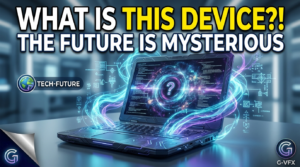
For example, instead of creating a simple image of a laptop, you can create a mysterious futuristic laptop surrounded by glowing effects that makes viewers wonder what is happening.
2. Simple and Clear Composition
A common mistake is adding too many elements.
Your thumbnail should have:
- One main subject.
- A clear background.
- Strong contrast.
- Space for text.
- A recognizable concept.
Remember that most viewers see thumbnails on small mobile screens, so complicated designs often fail.
3. Professional Visual Style
AI image generators work best when you describe the style clearly.
Useful keywords include:
- Cinematic lighting
- Ultra realistic
- High contrast
- Professional YouTube thumbnail
- 16:9 composition
- Dramatic atmosphere
How to Create Powerful AI Prompts for YouTube Thumbnails
A good AI prompt is not just a sentence. It is a detailed creative instruction.
A strong prompt usually includes:
Subject
Describe the main object or character.
Examples:
- Futuristic robot
- Luxury car
- Mysterious person
- Digital technology
- Ancient discovery
Environment
Explain the location.
Examples:
- Modern office
- Dark laboratory
- Futuristic city
- Beautiful landscape
Emotion
Add the feeling you want viewers to experience.
Examples:
- Mysterious
- Exciting
- Inspiring
- Shocking
Design Style
Mention:
- Cinematic
- Realistic photography
- 3D render
- Viral YouTube style
25 AI Prompts for Faceless YouTube Thumbnails That Get Attention
1. Business YouTube Thumbnail Prompt
Prompt:
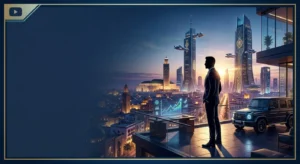
Create a viral YouTube thumbnail for a faceless business channel showing a mysterious entrepreneur silhouette standing in front of a futuristic city, luxury atmosphere, dramatic cinematic lighting, success concept, realistic style, high contrast, professional YouTube thumbnail design, empty space for text.
2. AI Technology Thumbnail Prompt
Prompt:
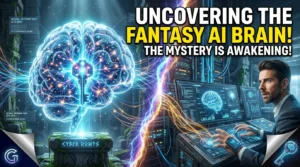
Create a futuristic AI technology YouTube thumbnail showing a glowing artificial intelligence brain connected with digital networks, cyber background, neon effects, cinematic lighting, ultra realistic style, high curiosity factor.

3. Make Money Online Thumbnail Prompt
Prompt:
Create a high CTR YouTube thumbnail showing digital money coming from a laptop, modern workspace, mysterious online entrepreneur, dramatic lighting, success feeling, realistic photography style.

4. Documentary Channel Thumbnail Prompt
Prompt:
Create a cinematic documentary thumbnail showing a mysterious historical location, abandoned building, dramatic sky, realistic details, dark atmosphere, professional documentary style.

5. Motivation Channel Thumbnail Prompt
Prompt:
Create an inspirational YouTube thumbnail showing a person silhouette standing on a mountain peak during sunrise, powerful emotional atmosphere, cinematic lighting, success and achievement concept.

6. Luxury Lifestyle Thumbnail Prompt
Prompt:
Create a luxury lifestyle YouTube thumbnail featuring a modern mansion, private jet, expensive car, golden lighting, premium lifestyle atmosphere, realistic cinematic design.

7. Fitness Channel Thumbnail Prompt
Prompt:
Create a fitness transformation YouTube thumbnail showing a powerful athlete silhouette, modern gym background, dramatic shadows, intense energy, professional sports photography style.
8. Health Channel Thumbnail Prompt
Prompt:
Create a health YouTube thumbnail showing fresh healthy foods, wellness concept, glowing human silhouette, bright clean background, professional nutrition channel design.
9. Finance Thumbnail Prompt
Prompt:
Create a finance YouTube thumbnail showing stock market charts, digital money, futuristic trading room, dramatic lighting, professional investor atmosphere.
10. History Channel Thumbnail Prompt
Prompt:
Create a historical YouTube thumbnail showing ancient ruins, mysterious civilization, cinematic environment, realistic details, documentary photography style.
11. True Crime Thumbnail Prompt
Prompt:
Create a true crime YouTube thumbnail showing detective investigation elements, evidence board, dark room, suspense atmosphere, cinematic realism.
12. Gaming Thumbnail Prompt
Prompt:
Create a gaming YouTube thumbnail showing an epic futuristic battle scene, glowing effects, dramatic perspective, high energy composition, professional gaming style.
13. Travel Channel Thumbnail Prompt
Prompt:
Create a travel YouTube thumbnail showing a hidden paradise destination, beautiful landscape, dramatic clouds, adventure feeling, realistic photography style.
14. Food Channel Thumbnail Prompt
Prompt:
Create a food YouTube thumbnail showing a delicious premium meal, close-up photography, beautiful lighting, restaurant quality presentation.
15. Psychology Thumbnail Prompt
Prompt:
Create a psychology YouTube thumbnail showing a mysterious human brain concept, emotional atmosphere, scientific background, dark cinematic design.
16. Productivity Thumbnail Prompt
Prompt:
Create a productivity YouTube thumbnail showing a clean workspace, laptop, notebook, organized lifestyle, modern minimalist design.
17. Cryptocurrency Thumbnail Prompt
Prompt:
Create a crypto YouTube thumbnail showing futuristic digital coins, blockchain technology, glowing financial symbols, cyber atmosphere.
18. Real Estate Thumbnail Prompt
Prompt:
Create a real estate YouTube thumbnail showing a luxury modern villa, beautiful architecture, premium lighting, realistic photography style.
19. Science Thumbnail Prompt
Prompt:
Create a science YouTube thumbnail showing a futuristic laboratory, scientific experiment, advanced technology, cinematic realism.
20. Space Channel Thumbnail Prompt
Prompt:
Create a space YouTube thumbnail showing astronauts, planets, galaxies, mysterious universe, realistic cinematic style.
21. Storytelling Thumbnail Prompt
Prompt:
Create a storytelling YouTube thumbnail showing a mysterious character silhouette, emotional environment, cinematic lighting, curiosity-driven design.
22. Automation Channel Thumbnail Prompt
Prompt:
Create an AI automation YouTube thumbnail showing robots, digital workflows, futuristic office, professional technology design.
23. Self Improvement Thumbnail Prompt
Prompt:
Create a self improvement YouTube thumbnail showing before and after transformation, success journey, emotional storytelling, cinematic style.
24. Educational Thumbnail Prompt
Prompt:
Create an educational YouTube thumbnail showing technology, books, creative learning environment, inspiring modern design.
25. Viral Curiosity Thumbnail Prompt
Prompt:
Create a viral YouTube thumbnail designed for maximum clicks, mysterious object, dramatic lighting, emotional reaction, cinematic composition, high contrast, professional creator style.
Best AI Tools for Creating Faceless YouTube Thumbnails
| AI Tool | Best Use |
|---|---|
| Midjourney | Cinematic and realistic images |
| Leonardo AI | YouTube thumbnail concepts |
| DALL-E | Creative AI visuals |
| Canva AI | Editing and adding text |
| Adobe Firefly | Professional designs |
Common Thumbnail Mistakes You Should Avoid
Even with AI, poor design choices can reduce your results.
Avoid:
- Using too much text.
- Creating confusing images.
- Adding unnecessary details.
- Choosing weak colors.
- Making thumbnails without emotion.
- Copying competitors without adding originality.
How to Improve Your Faceless YouTube Thumbnail Performance
Follow this simple workflow:
- Study successful channels in your niche.
- Identify what emotion their thumbnails create.
- Generate multiple AI versions.
- Test different designs.
- Analyze your click-through rate.
- Improve based on audience behavior.
The best creators constantly test and improve instead of creating one thumbnail and forgetting about it.
Frequently Asked Questions About Faceless YouTube Thumbnail Prompts
What are faceless YouTube thumbnail prompts?
Faceless YouTube thumbnail prompts are detailed instructions used with AI image generators to create attractive thumbnails for channels where the creator does not appear on camera.
Can AI thumbnails help increase YouTube views?
Yes. AI thumbnails can help increase clicks when they are combined with strong storytelling, emotional design, and proper optimization.
Which AI tool is best for YouTube thumbnail creation?
The best tool depends on your needs. Midjourney is excellent for realistic images, while Canva is useful for editing and adding text.
How long should an AI thumbnail prompt be?
A detailed prompt with the subject, style, emotion, lighting, and composition usually creates better results than a short description.
Conclusion: Create Thumbnails That Make People Click
Building a successful faceless YouTube channel requires more than uploading videos. You need visuals that capture attention before viewers even know your content exists.
With these 25 AI prompts for faceless YouTube thumbnails, you can create professional designs, test different concepts, and build a stronger visual identity for your channel.
Start experimenting with these prompts today, customize them for your niche, and turn your thumbnails into powerful tools that attract more viewers and grow your audience.