How to Write Prompts That Turn Ideas Into Stunning Images
AI Image Prompts for Beginners: How to Write Prompts That Turn Ideas Into Stunning Images
If you’ve ever typed a few words into an AI image generator and felt disappointed by the result, you’re not alone. You probably had a clear picture in your head, but what came out on the screen didn’t match it at all. That gap between imagination and output is exactly where most beginners get stuck.
The good news? The problem isn’t your creativity — it’s your prompt.
Once you understand how AI image prompts for beginners actually work, everything changes. You stop guessing. You start guiding. And suddenly, the images feel intentional instead of random. This guide shows you how to write prompts that make AI understand what you want to see.
What Are AI Image Prompts (In Simple Terms)?

An AI image prompt is a written description that tells an AI system what kind of image to generate. Think of it as giving directions to a very fast artist who doesn’t ask questions. The clearer and more detailed your instructions are, the better the final image looks.
For beginners, prompts often fail because they are:
- Too short
- Too vague
- Missing important visual details
AI doesn’t “imagine” like you do. It reacts to words. Every word matters.
Why Beginners Struggle With AI Image Prompts

Most beginners assume the AI will “figure it out.” That’s the biggest mistake.
Common issues include:
- Writing one-word prompts like “cat” or “logo”
- Forgetting to describe style, mood, or lighting
- Mixing too many ideas into one sentence
- Copying prompts without understanding them
Once you shift your mindset from user to director, your results improve instantly. You’re not asking the AI to be creative for you — you’re guiding its creativity.
The Basic Structure of AI Image Prompts for Beginners
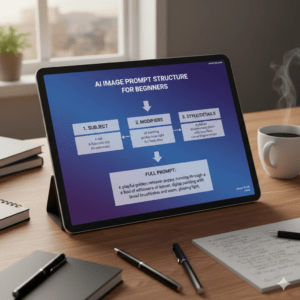
A strong prompt usually follows a simple structure. You don’t need to use it perfectly every time, but it gives you a reliable starting point.
The 5 Core Elements of a Good Prompt
- Subject – What is the image about?
- Action or Pose – What is happening?
- Style – How should it look visually?
- Environment – Where is the subject?
- Mood & Lighting – What does it feel like?
Simple Prompt Formula
Subject + Action + Style + Environment + Lighting
This structure alone will place you ahead of most beginners.
Step-by-Step: How to Write AI Image Prompts as a Beginner
Step 1: Start With a Clear Subject
Be specific. Instead of writing:
- ❌ “a woman”
Try:
- ✅ “a young woman with curly hair wearing a beige coat”
Specific details give the AI fewer chances to guess wrong.
Step 2: Add an Action or Pose
This brings your image to life.
- Sitting, walking, smiling, holding, looking at something
Example:
- “a young woman reading a book”
Step 3: Choose a Visual Style
Style tells the AI how to render the image.
Common beginner-friendly styles include:
- Realistic photography
- Digital illustration
- Watercolor painting
- Cinematic lighting
- Anime style
Example:
- “realistic photography style”
Step 4: Define the Environment
Context matters more than most beginners realize.
- Indoors or outdoors
- City, nature, studio, café
Example:
- “inside a cozy café with wooden furniture”
Step 5: Set the Mood and Lighting
Mood shapes the emotional impact.
- Warm, soft, dramatic, dark, cheerful
Lighting examples:
- Soft natural light
- Golden hour sunlight
- Studio lighting
Beginner Prompt Example (With Explanation)
Prompt:
A young woman with curly hair reading a book, realistic photography style, sitting in a cozy café with wooden furniture, warm natural light, shallow depth of field.
Why this works:
- Clear subject
- One main action
- Defined style
- Specific environment
- Lighting sets the mood
This is a solid example of AI image prompts for beginners done right.
Prompt Modifiers That Instantly Improve Results
Modifiers are small additions that boost image quality.
Popular Style Modifiers
- ultra-detailed
- high resolution
- realistic
- cinematic
- soft focus
Camera & Art Modifiers
- wide angle
- close-up
- depth of field
- dramatic shadows
You don’t need all of them. One or two is often enough.
Prompt Ingredients Table (Beginner Framework)
| Prompt Ingredient | What It Does | Example |
|---|---|---|
| Subject | Main focus | A golden retriever |
| Action | Adds movement | Running |
| Style | Defines look | Realistic photography |
| Environment | Adds context | Green park |
| Lighting | Sets mood | Soft morning light |
Use this table like a checklist when you feel stuck.
Best Tips to Improve AI Image Prompts Over Time
- Change one thing at a time and test again
- Save prompts that work well
- Study what words improve results
- Rewrite prompts instead of starting from scratch
Progress comes from small adjustments, not big jumps.
FAQ: AI Image Prompts for Beginners
What are the best AI image prompts for beginners?
The best prompts are clear, structured, and focused on one idea. Short descriptions with specific details work better than long, messy sentences.
How long should AI image prompts be for beginners?
Usually one or two detailed sentences are enough. Length matters less than clarity.
Can beginners copy AI image prompts?
Yes, but copying alone won’t help you improve. Learn why a prompt works, then adapt it.
Why do my images still look wrong?
Sometimes the AI model has limits. Other times, your prompt is missing a key detail like lighting or style.
Conclusion: Your Next Step With AI Image Prompts
Writing effective AI image prompts isn’t about talent — it’s about clarity. Once you learn how to describe what you see in your mind, AI becomes a powerful creative partner instead of a guessing machine.
You don’t need perfection. You need practice.
Your Action Step
Write three prompts today using the five-element structure. Test them. Adjust them. Save the best one. That’s how real progress starts.
If this guide helped you, explore more advanced prompt techniques, experiment with styles, and keep refining your approach. The better your prompts get, the closer your images will match your imagination.