How to Avoid Weird Hands in AI Images (And Finally Fix Them for Good)
How to Avoid Weird Hands in AI Images (And Finally Fix Them for Good)
Fix weird hands AI images is a common challenge for anyone using artificial intelligence to create realistic visuals. When you finally generate a beautiful AI image and then notice extra fingers, distorted palms, or unnatural hand poses, the entire result can feel ruined.
If you’ve ever generated what looked like a perfect AI image—great lighting, stunning face, flawless style—only to zoom in and feel your stomach drop because the hands look wrong, you’re not alone. Extra fingers, melted palms, twisted wrists… weird hands are one of the most common and frustrating problems in AI image generation.
The good news? You can fix weird hands in AI images, and in many cases, you can avoid them entirely. In this guide, you’ll learn why AI struggles with hands, how to prevent those mistakes, and what to do when they still happen. Everything here is practical, tested, and designed so you can apply it immediately.
Why AI Images Create Weird Hands in the First Place
Universal “Safe Hands” Base Prompt (Use Everywhere)
Prompt:
ultra-realistic portrait photo, natural human anatomy, perfectly formed hands with five fingers, correct finger proportions, realistic joints and knuckles, relaxed natural pose, hands clearly visible, sharp focus, high detail, professional studio lighting, 85mm lens, shallow depth of field
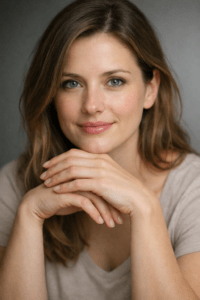
Why it works:
This explicitly tells the model what correct hands look like, not just what to avoid.
Before you can fix the problem, you need to understand it.
AI doesn’t “see” hands the way you do. It predicts pixels based on patterns in data. Hands are especially hard because:
- They have many joints and angles
- Fingers overlap and bend in complex ways
- Hands are often partially hidden in training images
- Small errors are very noticeable to the human eye
When the model is unsure, it fills in the gaps. That’s when you get six fingers, fused thumbs, or hands that don’t connect properly to arms.
Understanding this helps you stop fighting the AI and start guiding it correctly.
How to Avoid Weird Hands in AI Images Using Better Prompts
2. Professional Portrait (Hands Visible but Natural)
Prompt:
professional business portrait, confident subject, hands resting naturally, anatomically correct fingers, realistic skin texture, natural finger spacing, no deformation, no extra fingers, high-resolution photography, soft studio lighting, clean background

Your prompt is the most powerful tool you have. Most hand issues start with prompts that are too vague.
Be Explicit About Hands
Never assume the model will “figure it out.” Tell it exactly what you want.
Instead of:
- “A woman holding a cup”
Use:
- “A woman holding a cup with natural human hands, five fingers on each hand, realistic anatomy, relaxed grip”
Clarity reduces guesswork.
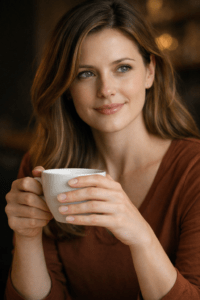
Lifestyle / Editorial Image (Hands in Action)
Prompt:
editorial lifestyle photography, person holding a coffee cup, accurate hand anatomy, correct grip, five fingers per hand, natural thumb placement, realistic hand proportions, detailed skin texture, cinematic lighting, candid moment, high clarity
Use Negative Prompts Every Time
Negative prompts are essential if you want to fix weird hands in AI images.
Add these consistently:
- extra fingers
- missing fingers
- deformed hands
- mutated fingers
- broken anatomy
- distorted palms
This tells the model what to avoid, not just what to create.
Keep Hand Instructions Simple and Focused
Close-Up Hands (Maximum Control)
Prompt:
close-up shot of human hands, anatomically accurate, five fingers per hand, realistic finger length, visible knuckles, natural skin folds, sharp focus, macro photography, professional lighting, ultra-high detail
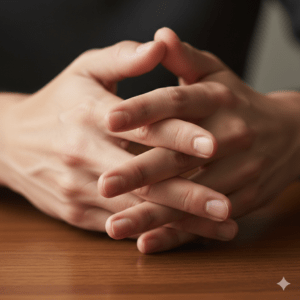
💡 Pro tip: Close-ups force the AI to respect anatomy more strictly.
Overloading your prompt can make things worse. If you describe ten styles, five emotions, and three camera angles, anatomy often suffers.
Rule of thumb:
- First: anatomy and pose
- Second: subject and action
- Third: style and aesthetics
Hands come before art style.
Choose the Right Pose to Prevent Hand Errors
Certain poses almost guarantee problems.
High-Risk Poses
- Hands behind the back
- Fingers tightly intertwined
- Hands holding complex objects
- Extreme foreshortening
Safer Alternatives
- Hands resting naturally
- Open palms
- One hand visible, one relaxed
- Simple grips (cup, book, phone)
If you don’t need complex hand gestures, don’t ask for them.
Use Inpainting to Fix Weird Hands AI Images
Even with perfect prompts, mistakes happen. That’s where inpainting becomes your best friend.
Why Inpainting Works
- You regenerate only the hand area
- The rest of the image stays untouched
- You can focus the prompt entirely on anatomy
Simple Inpainting Workflow
- Mask only the hand (be precise)
- Prompt: “realistic human hand, five fingers, correct anatomy”
- Add strong negative prompts
- Generate multiple variations and choose the best
Inpainting alone can save images you’d otherwise throw away.
AI Settings That Reduce Weird Hands
Small technical adjustments make a big difference.
Sampling Steps
- Too low = unstable details
- Too high = overcooked anatomy
Recommended range: 25–40 steps
CFG Scale
- Very high CFG can force distorted compliance
Recommended range: 6–9
Seed Control
- If one version has good hands, reuse the seed
- Make small prompt changes instead of starting over
Consistency helps the model stay “on track.”
Use Reference Images and Pose Control
If your tool supports it, reference images dramatically reduce hand errors.
Best Options
- Hand reference photos
- Pose skeletons
- OpenPose hand maps
- Depth or control images
When the AI has a visual guide, it doesn’t have to guess.
Common Mistakes That Make Weird Hands Worse
Avoid these traps if you want clean results.
- Ignoring hands entirely in the prompt
- Zooming too far out so hands are tiny
- Cropping hands at the edge of the frame
- Regenerating the whole image instead of inpainting
- Accepting “almost correct” hands (they rarely improve later)
If hands matter, treat them as a primary feature, not an afterthought.
Quick Reference Table: Prompt Ingredients to Fix Weird Hands AI Images
| Element | What It Does | Example |
|---|---|---|
| Hand description | Guides anatomy | realistic human hands, five fingers |
| Pose clarity | Reduces confusion | hands resting naturally |
| Visibility | Prevents hallucination | hands fully visible |
| Negative prompts | Removes errors | extra fingers, deformed hands |
| Simplicity | Improves accuracy | avoid complex gestures |
Use this table as a checklist before generating.
FAQ: Fix Weird Hands AI Images
Why do AI images mess up hands so often?
Because hands are complex, varied, and poorly represented in many training images.
Can prompts alone fix weird hands in AI images?
Often yes—if they are specific, structured, and supported by negative prompts.
What’s the fastest way to fix weird hands AI images?
Inpainting only the hands with a focused prompt.
Will AI ever stop making hand mistakes?
Models are improving, but human guidance will remain important for high-quality results.
Conclusion: You’re Not Doing It Wrong—Hands Are Just Hard
Weird hands don’t mean you’re bad at AI image generation. They mean you’re working with a tool that still struggles with fine anatomy. Once you understand that, everything changes.
By:
- Writing clearer prompts
- Using negative prompts consistently
- Choosing safer poses
- Applying inpainting when needed
You can fix weird hands in AI images and avoid them far more often than you think.
Your Next Step (Call to Action)
Now it’s your turn.
Take one of your failed images and fix it using inpainting and a focused hand prompt. Compare the result. You’ll see the difference immediately.
If this guide helped you, save it, share it, and start building your own prompt library—because the best AI creators aren’t lucky, they’re deliberate.