40 ChatGPT Prompts for YouTube Script Writing to Go Viral
Master Your Content Flow: 40 ChatGPT Prompts for YouTube Script Writing to Go Viral
The blinking cursor is the enemy of every creator. You know the feeling: staring at a blank screen, three cups of coffee deep, trying to figure out how to turn a scattered idea into a 10-minute script that actually keeps people watching. It’s exhausting to balance the demands of the algorithm with your own creative spark. You have a message to share, but the friction of staring at a white page often kills the fire before you even hit “Record.”
But what if you had a seasoned scriptwriter sitting right next to you, ready to brainstorm at 2:00 AM? That’s what AI offers when handled with a craftsman’s touch. Using the right 40 ChatGPT Prompts for YouTube Script Writing isn’t about “cheating” or losing your soul to a machine—it’s about removing the friction between your vision and the “Publish” button. Let’s turn that creative burnout into a streamlined content machine that sounds like you, only faster.
The Foundation: Why Your Script Strategy Needs a Refresh

Before you dive into the list, you must realize that a script is the backbone of your retention rate. YouTube’s algorithm is obsessed with Average View Duration (AVD). If your video wanders or lacks a clear “payoff,” viewers bounce. A structured script is your only defense against the “back button.”
Why Use Prompts for Scripting?
Velocity: Reduce your drafting time from six hours to under forty minutes.
Structural Integrity: Ensure every video includes a hook, a meat, and a transition.
Psychological Triggers: Use AI to suggest “open loops” that keep people watching until the final second.
Category 1: The Hook and The Intro (Prompts 1-10)
The first 30 seconds determine if your video lives or dies. You need to stop the scroll and promise a transformation. Use these prompts to nail that crucial opening.
“Create 5 curiosity-gap hooks for a video about [Topic] that specifically target a common frustration in the [Niche] community.”
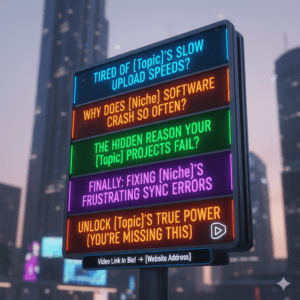
“Write a ‘pattern interrupt’ opening script that starts with a shocking statistic about [Topic].”
“Draft a story-based hook that begins with a failure I experienced while trying to [Goal].”
“Give me a script intro that uses the ‘Problem-Agitate-Solve’ framework for [Video Subject].”
“Write a high-energy intro that promises three specific ‘secret’ benefits to the viewer.”
“Generate a hook that challenges a popular opinion held by most people in the [Niche] industry.”
“Draft an intro that uses a ‘What if’ scenario to paint a picture of success for the viewer.”
“Write a 15-second script for a teaser that highlights the most exciting moment of the video.”
“Create a hook centered around ‘The One Mistake’ that is ruining the viewer’s progress in [Topic].”
“Generate an intro that builds immediate authority by referencing a recent trend or news event in [Topic].”
Category 2: Educational and Tutorial Content (Prompts 11-20)
When teaching a skill, clarity is king. If you confuse your audience, you lose them. Use these prompts to break down complex ideas into digestible “wins.”

“Explain [Complex Process] using an analogy involving [Simple Object] to make it easier for a beginner to understand.”
“Create a 5-step tutorial script for [Task], ensuring each step includes a ‘Why this matters’ section.”
“Write a script segment that addresses the top 3 mistakes beginners make when attempting [Process].”
“Generate a checklist-style script section for the tools needed to succeed at [Project].”
“Draft a ‘Deep Dive’ section that explains the science/logic behind [Concept] without using jargon.”
“Write a script that compares [Method A] vs [Method B], highlighting the pros and cons of each for different budgets.”
“Create a troubleshooting guide script for when things go wrong during [Task].”
“Draft a ‘Pro-Tip’ segment that offers a shortcut most people don’t know about in [Topic].”
“Write an ‘Expectation vs. Reality’ segment for someone starting out in [Niche].”
“Create a summary script that recaps the three main points of the tutorial for better retention.”
Table: Essential Script Ingredients for Tutorials
| Ingredient | Prompt Focus | Goal |
| The Hook | Immediate Value | Stops the scroll |
| The Problem | Agitate Pain Points | Builds empathy and relatability |
| The Setup | Necessary Tools | Prepares the viewer for action |
| The Solution | Step-by-Step | Provides the tangible “Win” |
| The Re-Hook | “Wait, there’s more” | Prevents mid-video drop-off |
| The CTA | Specific Engagement | Drives channel growth and subs |
Category 3: Engagement and “Stickiness” (Prompts 21-30)

Retention isn’t just about the start; it’s about the middle. You need to keep the energy high and the curiosity piqued.
“Write three ‘bridge sentences’ to smoothly transition from [Concept A] to the more complex [Concept B].”
“Give me a script for a mid-video ‘Engagement Break’ that asks the audience a specific question about their experience with [Topic].”
“Create an ‘Open Loop’ at the 4-minute mark that hints at a surprise reveal coming at the end of the video.”
“Draft a script for a ‘Pattern Interrupt’—a quick joke or visual change—to reset the viewer’s attention span.”
“Write a 30-second ‘Social Proof’ segment where I mention a testimonial or a community success story.”
“Generate a script for a ‘Subscribe Call’ that doesn’t feel pushy but links the subscription to the viewer’s benefit.”
“Write a ‘Myth-Buster’ segment that debunks a common lie the viewer has likely heard about [Topic].”
“Create a fast-paced ‘Lightning Round’ script where I answer 5 quick questions about [Topic].”
“Draft a script for a ‘Viewer Spotlight’ segment where I thank a specific commenter from a previous video.”
“Write a transition that uses a rhetorical question to lead into the next chapter of the video.”
Category 4: SEO, Metadata, and Call to Actions (Prompts 31-40)

A great video is useless if nobody finds it. These prompts help you optimize for the “robots” without losing the “humans.”
“Rewrite this video title to be more ‘Click-Worthy’ using power words, keeping it under 60 characters.”
“Analyze this script and list the 5 most important keywords I should include in my tags and description.”
“Write a 200-word YouTube description that naturally uses the phrase 40 ChatGPT Prompts for YouTube Script Writing and summarizes the video’s value.”
“Generate 3 different variations of a YouTube Thumbnail text overlay based on this script.”
“Write a pinned comment script that encourages viewers to click a link or join a newsletter.”
“Draft an ‘End Screen’ script that tells the viewer exactly which of my other videos they should watch next and why.”
“Create a script for an ‘Easter Egg’—a small hidden detail I can mention to reward viewers who stayed until the end.”
“Write a community post script to promote this video 24 hours after it goes live.”
“Generate a list of 5 ‘Time-Stamps’ with catchy titles based on the chapters in this script.”
“Write a ‘Final Thought’ script that leaves the viewer feeling inspired and ready to take action.”
Frequently Asked Questions (FAQ)
How do I best use 40 ChatGPT Prompts for YouTube Script Writing?
The “secret sauce” is iteration. Use these prompts to generate your first draft, then go through it with a red pen. Remove any “AI-speak” (words like delve, testament, or tapestry), add your personal stories, and ensure the tone matches your brand. Think of the AI as your architect and you as the interior designer.
Will using AI scripts hurt my channel’s reach?
No. YouTube doesn’t penalize AI content; it penalizes boring content. If your script provides value, keeps people watching, and solves a problem, the algorithm will reward it. The 40 ChatGPT Prompts for YouTube Script Writing are simply tools to help you structure that value more effectively.
Can I use these prompts for YouTube Shorts?
Absolutely. Just ask ChatGPT to “condense” the output of these prompts into a 60-second format. Focus heavily on the “Hook” and “Call to Action” prompts for the best results on the Shorts shelf.
Conclusion: Stop Typing, Start Creating
The era of struggling through a script for days is over. By implementing these 40 ChatGPT Prompts for YouTube Script Writing, you’re giving yourself the freedom to focus on what matters: your performance, your editing, and your community.
Efficiency is the bridge between an amateur hobbyist and a professional creator. Don’t let your best ideas die in your notes app because the writing process feels too heavy. Use these prompts to build the skeleton, add your own unique voice to provide the soul, and start hitting that upload button with confidence.
Ready to see these in action? Tell me your niche, and I can generate 5 custom-tailored script hooks for your next video right now!