20 Best Prompts for API Integration Help
20 Best Prompts for API Integration Help: A Practical Guide for Smoother Development
API integration is one of those tasks that looks simple on the surface and becomes complicated the moment you start working on it. You read the documentation, copy an example, and expect things to work. Instead, you run into authentication errors, broken responses, or data that refuses to behave the way you expect.
If you’ve been there, you’re not alone.
The good news is that you no longer have to figure everything out through trial and error. When used correctly, carefully written prompts can guide you through API integration step by step. This article explores the 20 best prompts for API integration help, shows you how to use them effectively, and explains why they can save you hours of frustration.
Why API Integration Feels Harder Than It Should
APIs are designed to connect systems, but the reality is often messy. Each API has its own rules, formats, and quirks. Even well-documented APIs can leave you guessing when something goes wrong.
Some of the most common challenges you face include:
- Confusing authentication methods
- Unclear request parameters
- Unexpected response structures
- Rate limits and performance issues
- Weak or outdated documentation
These issues don’t mean you lack skill. They simply reflect how complex modern integrations have become.
How Smart Prompts Help With API Integration
A well-crafted prompt works like a focused technical assistant. Instead of searching forums or reading dozens of documentation pages, you ask a clear question and get a direct explanation tailored to your situation.
When you use prompts for API integration help, you can:
- Understand APIs faster
- Debug errors more efficiently
- Generate cleaner request examples
- Handle responses safely
- Improve performance and security
The real advantage is speed without sacrificing quality.
How to Get Better Results From API Integration Prompts
Before using any prompt, provide enough context. Vague questions lead to vague answers.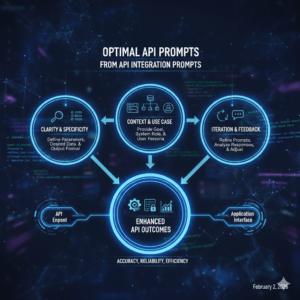
You should include:
- The API name and endpoint
- The programming language or framework
- The request method (GET, POST, etc.)
- Headers or authentication type
- Any error messages or unexpected output
The more precise you are, the more useful the response becomes.
20 Best Prompts for API Integration Help
Below are the most effective prompts, organized by real integration scenarios.
API Setup and Authentication Prompts

- “Explain how to authenticate with this API step by step using my programming language.”
- “Show me the safest way to store and use API keys in my project.”
- “Help me implement OAuth authentication and explain how token refresh works.”
- “Why am I getting an authentication error even though my API key is correct?”
These prompts help you clear the first and most common hurdle: access.
Request Creation Prompts
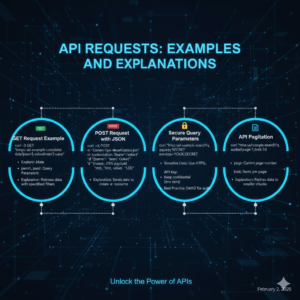
- “Create a complete GET request for this endpoint and explain each parameter.”
- “Show me how to send a POST request with JSON data and custom headers.”
- “How should I pass query parameters securely in this API request?”
- “Explain how pagination works for this API and provide an example.”
They ensure your requests match what the API actually expects.
Response Handling Prompts
- “Explain this API response structure in simple terms.”
- “Help me map this API response to my internal data model.”
- “How can I safely handle missing or optional fields in API responses?”
These prompts reduce bugs caused by incorrect assumptions about returned data
Error Handling and Debugging Prompts
- “Analyze this API error message and explain the root cause.”
- “How should I handle common API errors like 401, 403, and 429?”
- “Suggest a retry strategy for unstable API responses.”
Instead of guessing, you get clear explanations and solutions.
Performance and Scaling Prompts
- “How can I cache API responses to improve performance?”
- “Explain how to handle API rate limits without breaking the user experience.”
- “Help me optimize multiple API calls running in sequence.”
These prompts help you move beyond basic functionality.
Security and Best Practices Prompts
- “Review my API integration for common security risks.”
- “How do I validate and sanitize data received from an API?”
- “Suggest best practices for logging and monitoring API requests.”
Security-focused prompts protect your application long term.
Example: Applying API Integration Prompts in Practice
Here’s how these prompts work together in a real scenario:
| Task | Common Issue | Prompt Used | Outcome |
|---|---|---|---|
| Authentication | Invalid token | Auth explanation prompt | Successful access |
| Data fetching | Empty response | Response parsing prompt | Correct data mapping |
| Rate limiting | 429 error | Retry strategy prompt | Stable requests |
Using the right prompt at the right moment turns confusion into clarity.
Common Mistakes to Avoid When Using Prompts
Even strong prompts can fail if you use them poorly.
Avoid:
- Asking overly broad questions
- Leaving out error messages
- Mixing multiple problems in one prompt
Improve results by:
- Asking one focused question at a time
- Sharing relevant code snippets
- Requesting step-by-step explanations
This approach leads to consistent, high-quality answers.
Frequently Asked Questions About API Integration Help
What are the 20 best prompts for API integration help?
They are targeted questions designed to guide authentication, requests, error handling, performance, and security.
Are these prompts useful for beginners?
Yes. They are especially helpful if you’re still learning how APIs work.
Can these prompts be used with any language or framework?
Absolutely. You can adapt them for JavaScript, Python, Java, PHP, or others.
Is it safe to use prompts when working with APIs?
Yes, as long as you never share real API keys or sensitive credentials.
Make API Integration Work for You
API integration doesn’t have to feel overwhelming. When you rely on the 20 best prompts for API integration help, you replace frustration with direction. You debug faster, write cleaner code, and gain confidence with every project.
Instead of fighting documentation and error logs, you guide the process by asking better questions.
Your next move:
Save this list, try a few prompts in your next integration, and refine them to match your workflow. The more intentional your prompts become, the smoother your API integrations will be.
👉 Start using these prompts today and turn API integration into one of your strongest technical skills.
FAQ: API Setup and Authentication
1. What is API authentication?
- API authentication is the process of verifying the identity of a user or system to ensure they have the proper permissions to access an API. Common methods include using API keys, OAuth tokens, and basic authentication.
2. How do I authenticate API requests?
- To authenticate API requests, you’ll typically need an API key or OAuth token. These credentials are sent as part of your request headers or URL to identify and verify your application to the API server.
3. What are the common types of API authentication?
- The most common types of API authentication are:
- API Keys: A unique string assigned to the user or application to authenticate requests.
- OAuth: A more secure method where the user grants permission for an app to access certain resources without sharing their credentials.
- Basic Authentication: A simple method using a username and password for authentication, often over HTTPS.
4. Why is API authentication important?
- API authentication ensures that only authorized users or systems can access your API, protecting sensitive data and resources. It also helps track and monitor the usage of your API.
5. How can I handle expired API tokens?
- API tokens often have an expiration time. To handle this, you can implement token refresh mechanisms using OAuth, or simply request a new API key when the old one expires.
6. What is the difference between OAuth 1.0 and OAuth 2.0?
- OAuth 1.0 uses a more complex and secure method involving signatures and tokens, while OAuth 2.0 is simpler and more flexible, making it easier to implement, but less secure without additional measures like encryption.
7. How do I protect my API keys?
- Store API keys in environment variables or secure vaults, never expose them in client-side code or repositories, and use HTTPS to protect them during transmission.
8. Can I use OAuth for all types of APIs?
- OAuth is suitable for APIs that require secure delegated access, especially when accessing user data. However, for simple API access, basic authentication or API keys may be sufficient.
9. What are rate limits in API authentication?
- Rate limits control how often a user can make requests to an API within a given time frame. This helps prevent misuse and ensures fair usage. Always check the API documentation for specific rate limits and implement error handling for rate-limit errors.
10. How do I debug authentication errors in API requests?
- If you encounter authentication errors (e.g., 401 Unauthorized), check your credentials, ensure they are correctly passed in the request headers, and verify that your API key or OAuth token is still valid and has the required permissions.
Feel free to adjust these according to your specific needs or add more!