30 Professional Prompts for DevOps Automation
30 Professional Prompts for DevOps Automation That Help You Build Faster, Safer Pipelines
DevOps automation sounds great in theory. In practice, it often turns into a maze of scripts, brittle pipelines, and documentation no one wants to touch. You automate one task, only to discover three new points of failure hiding downstream. Over time, speed turns into stress.
That’s where well-crafted DevOps automation prompts come in.
When you use precise, professional prompts, automation stops feeling random. Instead of wrestling with tools, you guide them. In this guide, you’ll explore 30 professional prompts for DevOps automation that help you reduce manual effort, limit errors, and scale your workflows with confidence.
Why DevOps Automation Prompts Matter More Than Ever

Modern DevOps environments are complex by default. You’re dealing with cloud infrastructure, containers, CI/CD pipelines, monitoring systems, and security policies—often all at once. Automation is no longer optional, but automation without clarity creates risk.
Professional prompts act as structured intent. They tell automation tools:
- What environment you’re working in
- Which tools and standards you follow
- What outcomes are acceptable
- What must be validated before execution
Instead of hoping for usable output, you define it upfront.
How to Use These 30 Professional Prompts for DevOps Automation
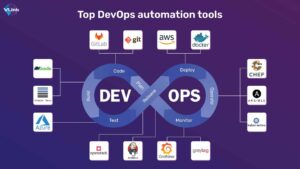
Before applying any prompt, you should frame your request correctly. The quality of automation depends directly on the quality of your instructions.
Best Practices for Prompt-Driven Automation
- Specify your cloud provider or platform
- Mention versions and constraints
- Include security and compliance expectations
- Request comments and explanations in generated outputs
- Ask for validation or test steps, not just final code
This approach keeps automation predictable and safe.
30 Professional Prompts for DevOps Automation (By Category)

Below, the prompts are grouped by real-world DevOps use cases so you can apply them immediately.
Infrastructure as Code Automation Prompts (1–6)
Infrastructure should be reproducible, auditable, and easy to modify.
Use these prompts to:
- Generate Infrastructure as Code for scalable environments with rollback support
- Create modular IaC structures for multi-environment deployments
- Validate infrastructure configurations for security and cost efficiency
- Generate networking resources using least-privilege access
- Convert existing manual infrastructure into Infrastructure as Code
- Add environment-specific variables and inline documentation
Infrastructure Automation Table
| Goal | Tools | Inputs | Output |
|---|---|---|---|
| Provision resources | Terraform | Region, size | Deployable code |
| Validate security | IaC scanner | Policies | Risk report |
CI/CD Pipeline Automation Prompts (7–12)
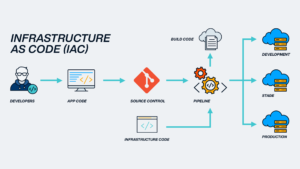
CI/CD pipelines are the backbone of DevOps speed—but also a common failure point.
Use these prompts to:
7. Generate complete CI/CD pipelines with build, test, and deploy stages
8. Create pipelines for multiple environments with approval gates
9. Optimize pipeline execution speed using caching strategies
10. Add automated rollback logic for failed deployments
11. Convert manual deployment steps into automated workflows
12. Generate pipeline documentation alongside configuration files
These prompts help you maintain consistency across teams and projects.
Containerization and Kubernetes Automation Prompts (13–18)
Containers simplify deployment, but orchestration introduces its own challenges.
Use these prompts to:
13. Generate optimized Dockerfiles for production workloads
14. Create Kubernetes manifests with health checks and resource limits
15. Build reusable Helm charts for scalable services
16. Configure horizontal pod autoscaling rules
17. Validate Kubernetes configurations for security risks
18. Generate isolated namespaces and deployment strategies
Why This Matters
Well-defined prompts prevent overprovisioning, reduce downtime, and improve service stability.
Monitoring, Logging, and Alerting Automation Prompts (19–23)
Observability should help you act early, not overwhelm you with noise.
Use these prompts to:
19. Generate monitoring rules for performance anomalies
20. Create dashboards based on real service metrics
21. Automate log parsing and error classification
22. Tune alert thresholds to reduce false positives
23. Generate incident summaries from logs and metrics
Monitoring Prompt Table
| Objective | Data Source | Logic | Output |
|---|---|---|---|
| Detect latency | Metrics | Threshold-based | Alerts |
| Visualize health | Logs | Pattern matching | Dashboard |
Security and Compliance Automation Prompts (24–27)
Security must be built into automation—not added later.
Use these prompts to:
24. Generate access policies using least-privilege principles
25. Automate secrets rotation workflows
26. Scan infrastructure and pipelines for vulnerabilities
27. Generate compliance and audit-ready reports
These prompts help you enforce standards without slowing delivery.
Incident Response and Optimization Prompts (28–30)
When systems fail, clarity and speed matter most.
Use these prompts to:
28. Generate auto-remediation scripts for common incidents
29. Perform root cause analysis using logs and metrics
30. Suggest infrastructure optimizations to reduce cost and latency
Automation here turns incidents into learning opportunities.
 Common Mistakes to Avoid with DevOps Automation Prompts
 Common Mistakes to Avoid with DevOps Automation Prompts
Even professional prompts can cause problems if used incorrectly.
Over-Automation Without Review
Automation should assist your decisions, not bypass them. Always review outputs before production use.
Ignoring Context
Prompts that ignore environment details often produce unsafe results.
Reusing Prompts Without Adaptation
Every system evolves. Your prompts should evolve with it.
How These 30 Professional Prompts Improve Your DevOps Workflow
When used consistently, these prompts change how you work:
- Faster deployments with fewer errors
- Clearer documentation generated automatically
- Easier onboarding for new team members
- Less time spent fixing preventable issues
You move from reactive maintenance to intentional system design.
FAQ: 30 Professional Prompts for DevOps Automation
What are DevOps automation prompts used for?
They guide automation tools to generate reliable scripts, pipelines, and configurations.
Are these prompts safe for production?
Yes, when reviewed, tested, and adapted to your environment.
Can beginners use DevOps automation prompts?
Absolutely. They can accelerate learning when paired with validation.
Do DevOps automation prompts replace engineers?
No. They reduce repetitive work and amplify expertise.
How often should prompts be updated?
Whenever tools, infrastructure, or policies change.
Conclusion: Automate with Precision, Not Assumptions
DevOps automation works best when it’s guided by clarity. These 30 professional prompts for DevOps automation give you a structured way to scale faster, reduce errors, and regain focus on what actually matters—building resilient systems.
Your next move:
Start with one category, test prompts in a non-production environment, and refine them for your stack. The more intentional your prompts become, the more dependable your automation will be.