How to Use Midjourney for Professional Logo Design
How to Use Midjourney for Professional Logo Design is the easiest way to create stunning, brand-ready logos using AI without hiring expensive designers.
Your logo is more than a graphic. It’s the first visual handshake between you and your audience. Whether you’re launching a startup, refreshing a personal brand, or building an online business, the right logo shapes how people feel about you before they ever read a word.
How to Use Midjourney for Professional Logo Design has become one of the most powerful ways for modern brands to build a professional visual identity without hiring an expensive agency.
Today, you no longer need an expensive agency or months of back-and-forth with designers. With the right approach, Midjourney allows you to create professional logo designs using AI, faster and more affordably than ever. This guide shows you exactly how to use Midjourney for professional logo design in a way that produces brand-ready results—not random images.
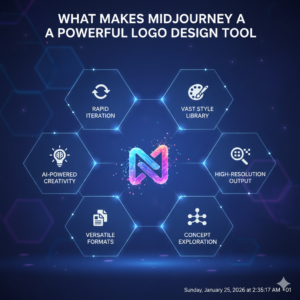
What Makes Midjourney a Powerful Logo Design Tool
Midjourney is an AI image generator that turns text into visuals. What makes it special for logo design is its ability to understand style, structure, color, and mood in a single prompt. Instead of sketching ideas or hiring multiple designers, you give Midjourney instructions, and it gives you visual concepts in seconds.
When used correctly, Midjourney allows you to:
- Generate dozens of logo concepts quickly
- Explore different styles without extra cost
- Maintain visual consistency
- Create designs that feel modern and market-ready
This makes it ideal for entrepreneurs, marketers, creators, and small businesses that need strong branding without massive budgets.
When you understand how to use Midjourney for professional logo design, you gain full control over your brand image, from color choices to typography and logo layout.
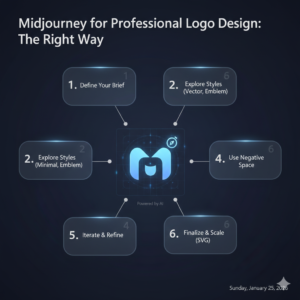
How to Use Midjourney for Professional Logo Design the Right Way
The biggest mistake people make is typing a random phrase like “logo for my business” and expecting magic. Professional logo design starts with clarity, not just AI.
Here’s the step-by-step method that actually works.
Step 1: Define Your Brand Before You Touch Midjourney
Before you generate anything, you must know what your logo stands for. Ask yourself:
- What industry are you in?
- Who is your target audience?
- Is your brand modern, playful, elegant, or bold?
- Do you want minimal or expressive?
Write down these five brand elements:
- Brand name
- Industry
- Brand personality
- Preferred colors
- Style direction
This gives your prompts direction and prevents generic results.
Step 2: Write a High-Quality Logo Prompt
Your prompt is your design brief. The better you describe your vision, the more professional your logo will look.
A strong Midjourney logo prompt should include:
- Style (minimal, flat, luxury, modern, etc.)
- Type (text logo, icon, emblem, mascot)
- Color scheme
- Industry
- Design rules (vector, clean, scalable)
Example Prompt
“Minimal modern logo for a fintech startup, blue and white color palette, clean flat vector design, scalable, professional branding, simple typography, white background”

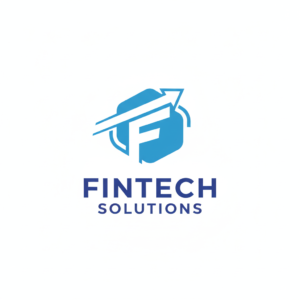
This kind of structure tells Midjourney exactly what to build.
Step 3: Generate, Compare, and Improve
Once you submit your prompt, Midjourney gives you four logo variations. Your job is to refine—not accept the first result.
Use this workflow:
- Pick the best option visually
- Request variations
- Adjust colors or style
- Simplify details
- Upscale the final version
The secret is repetition. Each refinement brings you closer to a logo that feels designed—not generated.
Best Midjourney Prompt Styles for Logo Design
Different businesses require different logo styles. Here are the most effective ones:
- Minimalist logos – Clean, modern, perfect for tech and SaaS
- Luxury logos – Black, gold, elegant fonts for premium brands
- Mascot logos – Fun characters for YouTube, gaming, or kids’ brands
- Corporate logos – Professional, neutral, trustworthy
- Creative logos – Artistic, abstract for agencies and designers
Choose the style that matches how you want people to feel when they see your brand.
How to Make Midjourney Logos Ready for Real Business Use
Midjourney creates beautiful images, but a logo must be usable everywhere—websites, social media, packaging, and print.
After you generate your logo:
- Export it in high resolution
- Remove the background
- Convert it to vector format
- Resize for different platforms
Tools like Photoshop, Illustrator, Canva, or vector converters help you turn your Midjourney logo into a professional brand asset.
Common Mistakes That Ruin AI Logos
Avoid these mistakes if you want real branding results:
- Using too many design elements
- Ignoring brand identity
- Choosing complicated shapes
- Not using flat or vector styles
- Using copyrighted logos or characters
Professional logos are simple, clear, and memorable. Midjourney can do this—but only if you guide it properly.
Is Midjourney Good Enough for Real Businesses?
Yes. Many startups, creators, and online brands already use AI-generated logos as their official branding. When done right, these logos are:
- Clean
- Original
- Scalable
- Market-ready
Midjourney doesn’t replace designers—it gives you creative control. You decide the direction, and the AI handles the execution.
Why Midjourney Changes the Logo Design Game
Traditional logo design can cost hundreds or thousands of dollars. Midjourney gives you unlimited concepts for a fraction of that price. More importantly, it gives you creative freedom.
You’re no longer limited to one designer’s vision. You can explore ideas, test styles, and shape your brand until it feels right.
That’s what professional branding is really about.
How to Use Midjourney for Professional Logo Design Successfully
When you combine:
- A clear brand vision
- Strong prompt structure
- Repeated refinements
- Proper export tools
You get logos that look like they came from a professional studio—even though they were created with AI.
And the best part? You control everything.
Final Thoughts and Call to Action
Your brand deserves more than a rushed or generic logo. With Midjourney, you now have the power to create a visual identity that feels modern, confident, and memorable.
If you want to stand out, start experimenting today. Write your first logo prompt, refine it, and build something that truly represents you.
🚀 Try Midjourney now and begin creating professional logo designs that make your brand impossible to ignore.