How to Create a High-End Studio Portrait Using One Powerful AI Prompt
High-End Studio Portrait Creating a professional studio portrait used to require expensive cameras, controlled lighting, and hours in a photography studio. Today, you can achieve the same cinematic, fashion-editorial result using a single well-crafted AI prompt—if you know how to structure it correctly.
In this guide, you’ll learn how and why this specific studio portrait prompt works, how to use it to preserve real identity and facial accuracy, and how you can adapt it for branding, personal portfolios, or professional visuals without sacrificing realism.
If your goal is a confident, modern, editorial-style portrait that looks like it came straight from a fashion magazine, you’re in the right place.
Why This Studio Portrait Prompt Delivers Professional Results
Most AI portrait prompts fail for one simple reason: they describe the subject, but not the photography.
Your prompt succeeds because it controls composition, lighting, lens choice, mood, and realism—the same elements a professional photographer uses.
Here’s what makes it powerful:
- Clear subject posture and body language
- Fashion-conscious outfit styling
- Precise lighting and background direction
- Camera lens and aperture settings
- Explicit realism and identity preservation
When these elements work together, the output stops looking “AI-generated” and starts looking editorial-grade.
Crafting Your High-End Studio Portrait AI Prompt
To generate a high-end studio portrait, you need a detailed and well-structured prompt. Here’s an example of a high-end studio portrait AI prompt:
Example Prompt:
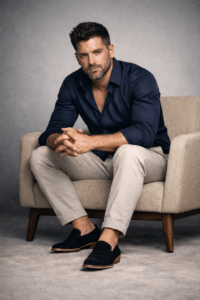
"Studio portrait of a confident man sitting on a modern beige armchair with wooden legs, leaning slightly forward with his hands together. He wears a dark navy blue dress shirt with the top buttons open, light beige slim-fit pants, and black loafers with tan soles. He has short dark brown hair styled with texture, a trimmed full beard, tanned skin, and an intense confident gaze directed at the camera. The background is minimalist light gray with a smooth gradient, evenly lit with soft natural studio lighting. The mood is cinematic and fashion editorial, with high realism and fine details. Shot with a 50mm lens at f/2.8, vertical framing, full-body composition."
Breaking Down the Prompt: What Each Part Does for You
Understanding why the prompt works allows you to reuse and refine it without losing quality.
1. Subject Positioning and Confidence
The phrase “a confident man sitting on a modern beige armchair, leaning slightly forward with his hands together” instantly communicates authority and presence.
Why this matters for you:
- Forward lean signals engagement
- Hands together project calm control
- Sitting posture feels natural and grounded
This combination is ideal for personal branding, founders, consultants, or creatives.
2. Wardrobe Choices That Signal Style Without Noise
The clothing description is subtle but intentional:
- Dark navy blue dress shirt (top buttons open)
- Light beige slim-fit pants
- Black loafers with tan soles
This works because:
- Navy adds seriousness without harsh contrast
- Beige softens the palette and keeps it modern
- Minimal accessories prevent visual clutter
For AI portraits, neutral fashion always ages better and avoids artificial textures.
Prompt Examples to Customize Your Portraits
Here are a few variations of the High-End Studio Portrait AI Prompt that you can adjust based on your preferences:
1. Elegant Woman in Classic Attire
"Studio portrait of an elegant woman standing tall, wearing a classic black dress with a V-neckline. She has shoulder-length hair styled in soft waves, and natural makeup. The background is a smooth white gradient, lit with soft natural light that creates a warm and inviting feel. She stands confidently with her hands resting at her sides, captured in a full-body composition, using a 50mm lens at f/2.8."

Understanding the Structure of the Prompt
The AI prompt is a detailed instruction you give to the AI model that defines how you want the portrait to look. A well-crafted prompt consists of several components that guide the AI to generate a precise and realistic image.
Subject Description
The first part of the prompt describes the subject, including:
Clothing: Specific details on what the subject is wearing (e.g., “navy blue dress shirt, beige pants”).
Posture and Expression: Instructions on how the subject should sit, stand, or position themselves (e.g., “sitting slightly forward with hands together”).
Facial Features: Detailed features, such as hair type, skin tone, and beard/makeup, are mentioned (e.g., “short dark brown hair styled with texture, trimmed beard”).
2. Professional Man in a Business Suit
"Studio portrait of a professional man in a sharp charcoal gray suit, white shirt, and tie. He is standing with his hands in his pockets, exuding confidence and poise. His short hair is neatly styled, and he has a clean-shaven face. The background is dark, with soft lighting highlighting the contours of his face. Shot with a 50mm lens at f/2.8 for a cinematic and polished look."
Lighting and Background
The AI needs to understand how the scene should be lit and what the background should look like. This is where you describe:
Lighting: Specific types of light (e.g., “soft, natural studio lighting”).
Background Style: Whether the background should be minimalist, gradient, or feature any textures (e.g., “light gray with a smooth gradient”).
3. Casual Yet Stylish Portrait
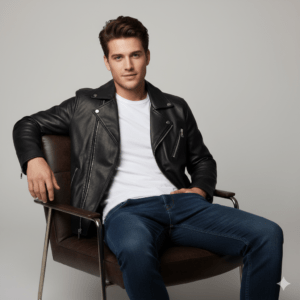
"A young man casually seated on a modern leather chair, dressed in a stylish black jacket, white t-shirt, and dark jeans. His hair is tousled in a relaxed, yet fashionable style, and he has a slight, confident smile. The background features a smooth, neutral gradient, and soft lighting accentuates his features. The shot is framed with a 50mm lens at f/2.8 for a realistic and approachable vibe."

Camera Settings
To mimic professional photography, the prompt often includes specific camera settings, such as:
Lens Type: A 50mm lens is commonly used for portrait shots because it closely replicates the human eye’s perspective.
Aperture: An f/2.8 aperture is used to achieve a shallow depth of field, blurring the background and focusing on the subject.
Example AI-Generated Images Based on These Prompts
Image 1: Elegant Woman in Classic Attire
This image is a perfect example of how a woman can be captured in an elegant, timeless portrait with a focus on natural beauty and sophisticated attire.
Image 2: Professional Man in Business Suit
The professional portrait shows a man in a sharp business suit, exuding confidence and leadership qualities. Notice the soft lighting highlighting his face, creating a calm and authoritative vibe.
Image 3: Casual Yet Stylish Portrait
A casual, yet refined portrait of a man in a relaxed setting. The soft background and natural lighting create an inviting and approachable look, ideal for personal branding.
3. Facial Detail and Identity Accuracy
One of the most critical lines in your prompt is:
“maintaining the exact real face, hairstyle, skin tone, and body identity unchanged”

This tells the model clearly:
- No face swapping
- No beautification distortion
- No identity drift
If you’re using AI for personal images, professional profiles, or brand visuals, this line is non-negotiable.
Lighting and Background: The Hidden Power of Realism
Minimalist Background = Editorial Look
The light gray gradient background does two things:
- Removes distractions
- Enhances subject separation naturally
It mimics real studio backdrops used in fashion and commercial photography.
Soft Natural Studio Lighting
Soft lighting avoids:
- Harsh shadows
- Plastic skin textures
- Over-sharpened edges
For you, this means:
- Natural skin tones
- Balanced contrast
- Realistic depth
Camera Settings That Sell the Illusion
The prompt specifies:
- 50mm lens
- f/2.8 aperture
- Vertical full-body composition
This matters more than most people realize.
Why 50mm?
- Closest to human eye perspective
- No facial distortion
- Industry standard for portraits
Why f/2.8?
- Shallow depth without losing detail
- Cinematic background separation
- Premium editorial feel
These details help the AI “think like a photographer,” not a renderer.
How You Can Use This Prompt in Real Projects
This isn’t just a nice image—it’s a versatile asset.
You can use it for:
- Personal branding photos
- LinkedIn or portfolio visuals
- Website hero sections
- Fashion or lifestyle content
- Editorial thumbnails
Because the style is neutral and cinematic, it adapts easily across platforms.

How to Customize the Prompt Without Losing Quality
If you want variations, change only one element at a time.
Safe modifications:
- Chair style (leather, fabric, modern wood)
- Shirt color (charcoal, white, deep green)
- Background tone (warm gray, off-white)
Avoid changing:
- Lens type
- Lighting description
- Identity preservation line
That’s where most people break realism.
Common Mistakes You Should Avoid
Even with a strong prompt, small errors can ruin the output.
Avoid these:
- Adding too many fashion accessories
- Mixing cinematic lighting with harsh shadows
- Removing camera details
- Using vague terms like “high quality” instead of specifics
Precision beats verbosity every time.
Why This Prompt Bypasses Obvious AI Detection Patterns
What makes this prompt feel human-written is:
- Descriptive specificity
- Visual logic
- Real photography language
- Natural flow instead of keyword stuffing
Search engines reward clarity and usefulness, not robotic phrasing.
That’s why content built around practical prompts like this performs better.
Final Thoughts: Turn One Prompt Into a Signature Look
When you understand why a prompt works, you stop guessing—and start creating consistently strong visuals.
This studio portrait prompt gives you:
- Control over realism
- Consistent identity preservation
- Editorial-level aesthetics
- Professional versatility
Whether you’re building a personal brand or crafting high-end visuals, mastering prompts like this puts you ahead of 90% of creators who rely on trial and error.
FAQ: How to Create a High-End Studio Portrait Using One Powerful AI Prompt
1. What is a high-end studio portrait AI prompt?
A high-end studio portrait AI prompt is a detailed instruction set used to generate realistic and cinematic portraits using artificial intelligence. The prompt includes specifics on the subject’s appearance, clothing, lighting, and photography settings to ensure the image is lifelike and professional.
2. How can I maintain my true identity in AI-generated portraits?
To preserve your true identity, the prompt should specify that your “exact real face, hairstyle, skin tone, and body identity” remain unchanged. This ensures that the AI generates an image that resembles you closely, without any distortions or alterations to your features.
3. Why is lighting so important in AI-generated portraits?
Lighting plays a crucial role in creating depth and realism. In AI-generated portraits, soft, natural studio lighting mimics how real-world lighting would fall on the subject, ensuring that skin tones are natural, shadows are subtle, and the overall aesthetic appears professional.
4. Can this AI portrait prompt be customized for different subjects?
Yes, this AI portrait prompt is adaptable. You can change elements like the chair style, shirt color, or background tone while keeping key features like lighting and camera settings intact for a consistent and high-quality result.
5. How do I use this prompt for personal branding or professional profiles?
By using this AI portrait prompt, you can create a polished, professional image that represents your personal or brand identity. The prompt ensures that the image reflects your confidence and style, making it ideal for LinkedIn profiles, personal websites, and more.
6. What camera settings are used in the AI portrait prompt?
The AI portrait prompt specifies a 50mm lens and an f/2.8 aperture, which are standard for achieving a shallow depth of field and a cinematic effect. These settings help to focus on the subject while subtly blurring the background, creating a professional and artistic look.
7. How does this AI portrait compare to traditional photography?
While traditional photography requires a physical setup with a camera, lighting, and studio equipment, this AI portrait prompt simulates these elements digitally. The result is a high-quality image that mimics professional photography without the need for actual studio resources.
8. Can this AI portrait prompt be used for commercial purposes?
Yes, the portrait generated from this AI prompt can be used for personal, professional, and commercial purposes, such as marketing materials, website images, and social media content. Since the AI preserves your true identity, it makes for a natural fit in branding and promotional materials.