ChatGPT Prompt to Create Brand Style Guide for AI Images (2026 Guide)
If you’ve ever generated AI images for your brand, you probably noticed something frustrating. One image looks modern and minimal. The next one looks cinematic. Another suddenly has completely different colors or lighting.
The problem isn’t the AI tool.
The problem is the lack of a clear brand style guide for AI images.
When you use the right ChatGPT prompt to create brand style guide for AI images, you can control how every visual looks. Your images begin to follow the same color palette, lighting style, composition, and mood. That consistency is what makes brands recognizable.
In this guide, you’ll learn how you can use ChatGPT to create a powerful AI image style guide, generate better prompts, and ensure every visual matches your brand identity.
Why You Need a Brand Style Guide for AI Images
AI image generators like Midjourney, DALL-E, and Stable Diffusion can produce incredible visuals. But they don’t automatically understand your brand.
Without a defined style guide, you may run into problems like:
- inconsistent colors
- different lighting styles
- random visual aesthetics
- weak brand recognition
If you want your visuals to look professional, you must guide the AI.
A brand style guide for AI images acts as a blueprint. It tells the AI what visual direction to follow every time you generate an image.
When you define the rules once, you can reuse them for hundreds of images without losing visual consistency.
What a Brand Style Guide for AI Images Includes
Before writing a ChatGPT prompt, you need to understand what makes up a strong AI visual identity.
A typical AI image style guide contains several core elements.
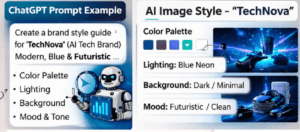
Brand Color Palette
Your color palette should stay consistent across every generated image.
For example, your brand may include:
- Primary color for main visual elements
- Secondary colors for accents
- Neutral background colors
When you add these colors to your AI prompts, your images instantly feel more unified.
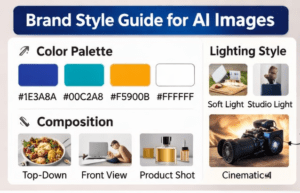
Example palette:
- Primary: Deep blue (#1E3A8A)
- Secondary: Soft teal (#2DD4BF)
- Neutral: Light gray (#F3F4F6)
Lighting Style
Lighting dramatically affects how an image feels.
Your style guide should define one primary lighting direction such as:
- natural daylight
- soft studio lighting
- cinematic dramatic lighting
- bright high-key lighting
If your brand focuses on food, lifestyle, or wellness, natural daylight often works best.
Composition Rules
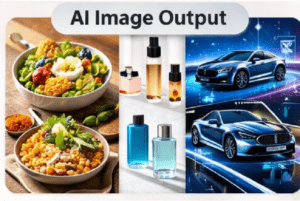
Composition determines how subjects appear inside the image.
Your guide may include rules like:
- centered composition
- rule of thirds
- flat lay photography
- wide cinematic framing
Once you define the structure, every image will follow the same visual rhythm.
Background and Environment
Backgrounds help reinforce your brand identity.
For example:
- minimal white background for product brands
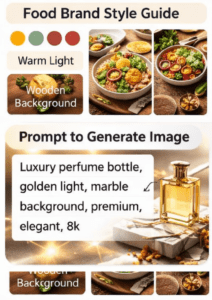
- wooden textures for food brands
- modern office environments for tech companies
Adding these details ensures your AI visuals feel connected.
Mood and Visual Tone
Mood defines the emotional feeling of your visuals.
Your brand could be:
- playful
- luxurious
- minimal
- futuristic
- organic
Once you define the tone, your AI prompts can replicate it consistently.
The Best ChatGPT Prompt to Create Brand Style Guide for AI Images
Now that you understand the components, you can use ChatGPT to generate a structured style guide.
Here is a powerful prompt you can use.
Act as a professional brand designer and visual identity expert.
Create a detailed brand style guide for AI-generated images.
Brand name: [Your brand name]
Industry: [Your niche]
Target audience: [Audience description]
Brand personality: [Modern, luxury, playful, minimal, etc.]
Include the following sections:
- brand color palette with HEX codes
- lighting style guidelines
- image composition rules
- background styles
- camera angles
- textures and materials
- mood and atmosphere
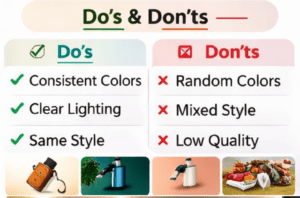
- do’s and don’ts for AI-generated images
Format the output as a structured visual brand style guide that can be used to generate AI image prompts.
When you run this prompt, ChatGPT will generate a full system you can reuse whenever you create images.
How to Turn a Style Guide into AI Image Prompts
Once ChatGPT creates your style guide, you can transform it into consistent AI prompts.
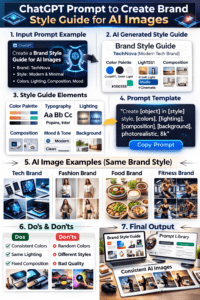
Think of your style guide as the recipe, and each prompt as the dish you cook from it.
For example, if your guide defines:
- natural daylight lighting
- fresh organic mood
- rustic wooden surfaces
- top-down composition
Your image prompt might look like this:
Healthy vegetable salad in ceramic bowl, rustic wooden table background, natural daylight lighting, fresh organic atmosphere, top-down food photography, minimal styling, high detail.
Notice how every element follows the rules defined in the guide.
This method ensures every image looks like it belongs to the same brand.
Creating a Prompt Library for Your Brand
One powerful strategy you can use is building a prompt library.
A prompt library is a collection of pre-written prompts designed for different marketing uses.
Instead of writing prompts every time, you reuse templates.
Your prompt library may include prompts for:
Blog images
Example prompt:
Modern workspace desk, laptop and notebook, natural daylight lighting, minimalist composition, neutral color palette, professional editorial photography style.
Social media posts
Example prompt:
Colorful smoothie bowl, vibrant fruit toppings, soft natural lighting, bright and cheerful mood, clean food photography.
Product marketing images
Example prompt:
Luxury skincare bottle on marble surface, soft studio lighting, elegant minimal background, premium beauty photography.
With a prompt library, you can create dozens of visuals quickly while maintaining brand consistency.
Common Mistakes When Creating AI Image Style Guides
Many creators make the mistake of skipping structure.
Here are some issues you should avoid.
Using Random Prompts
If every prompt is different, your visuals will never look consistent.
Instead, always follow the same core style elements.
Too Many Colors
Brands often add too many colors to prompts.
This leads to visual chaos.
Stick to a defined palette.
Ignoring Composition
Even if colors and lighting match, inconsistent composition can break the visual identity.
Choose one or two composition styles and reuse them.
Changing Mood Frequently
A luxury brand shouldn’t suddenly produce playful cartoon images.
Keep the emotional tone aligned with your brand personality.
Tools You Can Use with Your AI Image Style Guide
Once your style guide is ready, several tools can help you generate visuals.
AI image generators:
- Midjourney
- DALL-E
- Stable Diffusion
- Leonardo AI
Design platforms:
- Canva
- Adobe Firefly
- Figma
These tools allow you to apply your style guide across websites, ads, and social media.
How Consistent AI Visuals Strengthen Your Brand
Consistency is one of the most powerful elements of branding.
When your visuals follow the same structure, people begin to recognize your brand instantly.
Consistent visuals help you:
- build trust with your audience
- create a recognizable brand identity
- improve marketing performance
- stand out in crowded markets
That’s why companies invest heavily in visual style guides.
With AI tools, you can now build the same system quickly using ChatGPT.
Final Thoughts
AI image generation is incredibly powerful, but without guidance it can easily produce inconsistent results.
When you use a ChatGPT prompt to create brand style guide for AI images, you take control of the creative process. You define the colors, lighting, composition, mood, and visual rules that shape every image your brand produces.
Once you create your style guide, generating consistent visuals becomes effortless. Every image you produce will feel connected, professional, and instantly recognizable.
If you want your AI visuals to look like they came from the same creative studio, start by building your brand style guide today.
Now it’s your turn.
Open ChatGPT, use the prompt from this guide, and create your own AI image brand style system. Once you do, you’ll never struggle with inconsistent AI visuals again.