How to Create a Hyper-Realistic Cinematic AI Scene with Video Game Characters
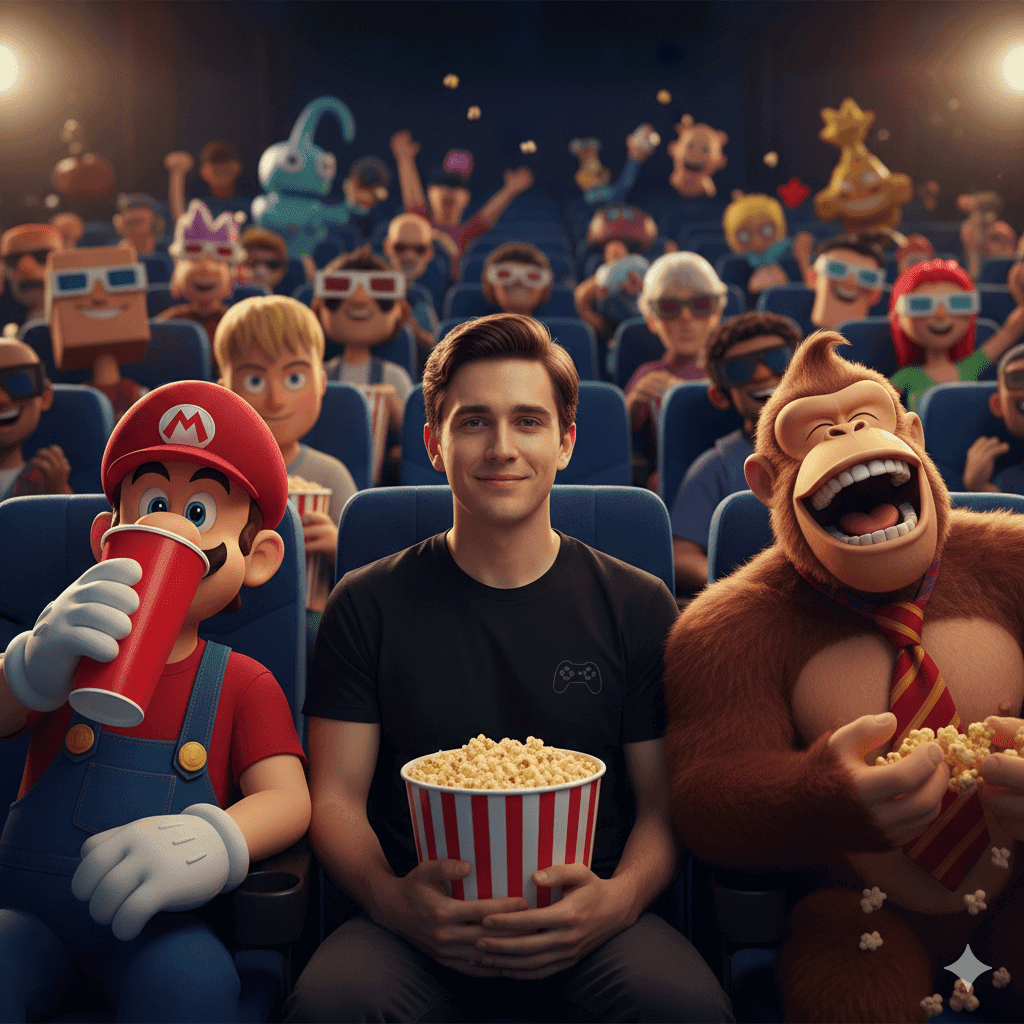
Visual storytelling has entered a new era. With a single, well-structured AI prompt, you can generate scenes that feel pulled straight from a blockbuster film. One powerful example is a hyper-realistic Cinematic AI moment inside a dark movie theater, filled with iconic video game characters reacting, laughing, and interacting in a lively, chaotic atmosphere.
If you want to create AI images that feel immersive, emotional, and unforgettable, this guide shows you how to think, structure, and optimize prompts like the one you’re using—while also helping your content rank and resonate with your audience.
Why Cinematic AI Prompts Work So Well
Cinematic prompts succeed because they do more than describe objects. They create context, emotion, and motion. When you guide the AI with lighting direction, character behavior, and environment detail, you give it a clear narrative framework.
 In your prompt, you don’t just say “movie theater.” You define:
- Darkness and blue seats
- A visible light source from an unseen screen
- Characters reacting emotionally
- Foreground, midground, and background layers
This layered storytelling is exactly what modern AI models interpret best.
The Power of a Central Human Character
Placing a human character at the center of the scene instantly grounds the image emotionally. You, as the viewer, connect first with the embarrassed man holding popcorn before noticing everything else around him.
This works because:
- A relatable expression (embarrassment) creates empathy
- Simple clothing avoids visual distraction
- The popcorn bucket becomes a visual anchor
When you design prompts, always ask yourself: Who is the emotional entry point for the viewer?
Using Iconic Characters Without Losing Focus
Your prompt balances chaos and clarity by positioning famous characters on each side of the main subject.
- On the left, Mario adds playful mischief.
- On the right, Donkey Kong amplifies humor and energy with exaggerated laughter.
Because they flank the main character, they enhance the scene without overpowering it.
This is a critical lesson: supporting characters should frame the story, not hijack it.
Background Characters Create Scale and Spectacle
In the theater seats behind them, you introduce a rich ensemble:
- Goku
- Kratos
- Sonic
- Link
- Zelda
- Princess Peach
- Pikachu
Some wear 3D glasses. Others toss popcorn. This controlled chaos makes the scene feel alive.
From a creative standpoint, this teaches you something important:
Movement in the background increases realism without adding clutter—if it’s intentional.

Lighting: The Secret Weapon of Realism
Lighting is what transforms an image from “good” to “cinematic.”
Your prompt specifies:
- A single dominant light source (the unseen screen)
- Reflections on faces
- Light bounce on popcorn buckets
- Subtle highlights in the darkness
This mirrors real film lighting techniques and gives AI a physical logic to follow.
If you want better results:
- Avoid vague lighting terms
- Always explain where the light comes from
- Describe how it interacts with materials (skin, plastic, fabric)
Hyper-Realism Comes from Material Detail
You don’t just say “popcorn bucket.” You say large red and white striped popcorn bucket.
That specificity matters.
Textures, colors, and materials tell the AI how surfaces behave under light. The more grounded those details are, the more believable the final image becomes.
This is why your prompt achieves a hyper-realistic look rather than a flat illustration.
SEO Insight: Why This Type of Content Performs Well
From an SEO perspective, articles built around advanced AI prompts perform strongly because they:
- Target long-tail, intent-driven searches
- Attract creators, designers, and marketers
- Encourage sharing and bookmarking
- Naturally earn backlinks from AI communities
When you explain why a prompt works—not just what it contains—you create lasting value.
How You Can Reuse This Prompt Style
You can adapt this cinematic structure to many niches:
- Replace the movie theater with a stadium, spaceship, or concert hall
- Swap video game characters for movie icons or original avatars
- Change emotions: awe, fear, tension, nostalgia
The framework stays the same:
- Clear environment
- Central emotional subject
- Supporting characters
- Dynamic background
- Logical lighting
Once you master this structure, your AI visuals instantly level up.
Common Mistakes to Avoid
When creating cinematic AI prompts, avoid:
- Listing characters without interaction
- Ignoring lighting direction
- Overcrowding the foreground
- Using generic adjectives like “cool” or “nice”
- Forgetting emotional cues
Your prompt succeeds because it avoids all of these.
Final Thoughts: Turn Prompts into Experiences
You’re no longer just generating images—you’re crafting moments.
By combining emotional storytelling, cinematic lighting, and iconic characters, you turn a simple prompt into an experience that feels alive. That’s what makes this style powerful, shareable, and search-friendly.
Call to Action
If you want more breakdowns like this—where prompts are analyzed, optimized, and transformed into high-impact creative assets—start experimenting now. Refine your prompts, test variations, and push your scenes further.
The difference between an average AI image and a cinematic masterpiece is not the tool—it’s how you describe the story.