Create a Cinematic Moon Portrait Using AI
Create a Cinematic Moon Portrait Using AI that feels poetic, emotional, and visually unforgettable is no longer limited to professional photographers or high-end studios. With the right AI prompt and a clear artistic vision, you can generate stunning photorealistic images that look like scenes pulled straight from a movie.
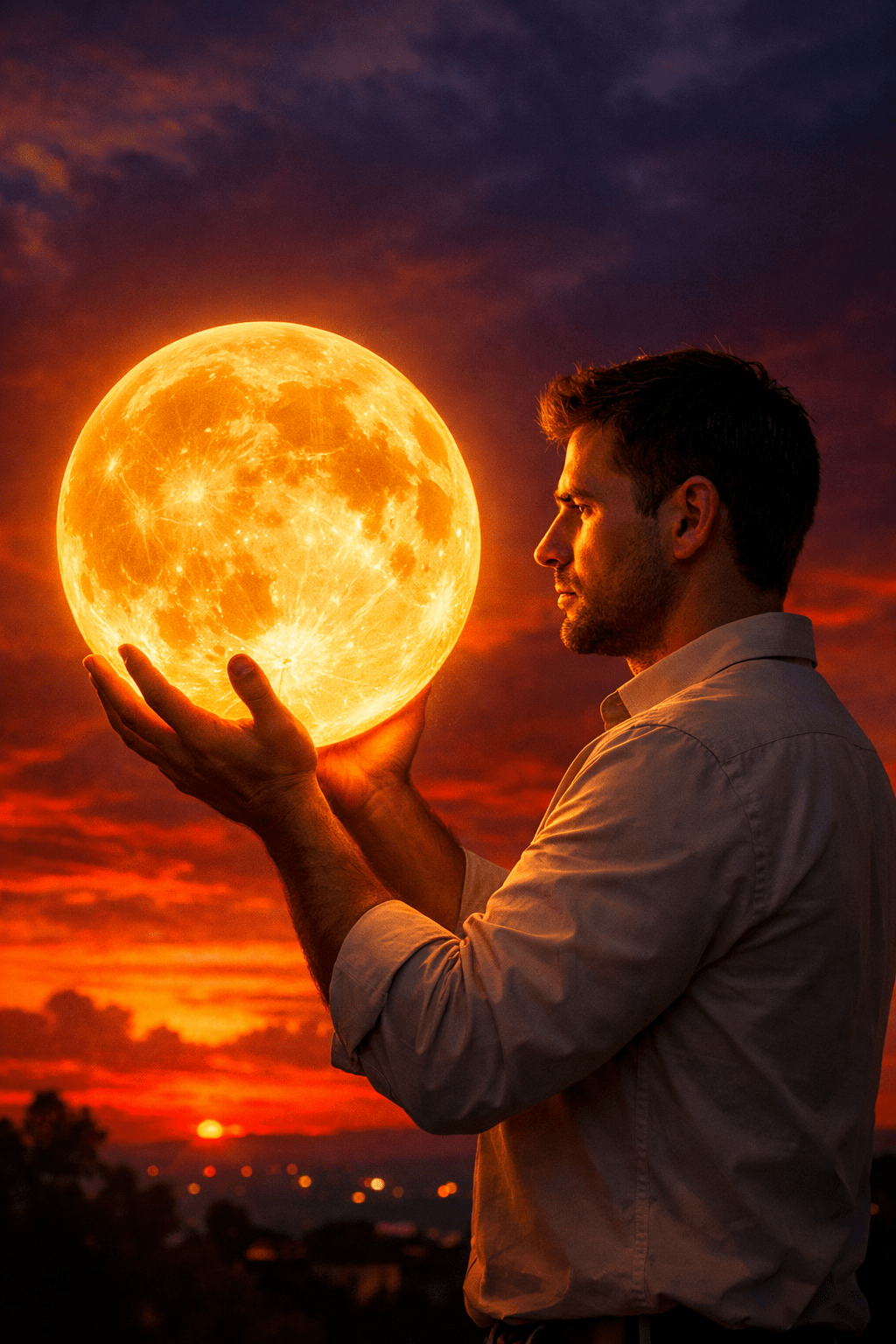
In this guide, you’ll learn how to use a cinematic AI prompt to create a powerful portrait featuring a man holding a glowing full moon at sunset. More importantly, you’ll understand why each element of the prompt matters, how it influences the final result, and how you can adapt this technique for your own creative projects.
Whether you’re a digital artist, content creator, or someone exploring AI image generation for the first time, this article will help you turn imagination into striking visuals.
Why Cinematic AI Portraits Are So Powerful
Cinematic portraits work because they tell a story in a single frame. Instead of just showing a face, they create emotion, tension, and atmosphere.
When you use a well-structured prompt like this one, you’re not just asking AI to generate an image. You’re directing a scene.
Cinematic AI portraits are effective because they combine:
- Strong composition rules
- Dramatic lighting and color grading
- Symbolic elements (like the moon)
- Emotional body language and framing
This combination results in images that feel intentional, artistic, and memorable.
Understanding the Core Concept of the Prompt
At its heart, this prompt is about contrast and symbolism.
You place a human subject against a vast, dramatic sky and give him control over something impossible: the moon. This instantly creates curiosity and meaning.
Key ideas behind the concept:
- The moon represents power, dreams, or inner light
- Sunset lighting adds emotion and warmth
- A profile pose creates mystery
- Strong colors increase visual impact
When AI understands these ideas through precise wording, the output becomes far more refined.
Breaking Down the Prompt Structure (And Why It Works)
Let’s look at the major components that make this prompt effective.
1. Composition and Framing
The prompt specifies a vertical composition with the subject positioned in the right third of the frame.
This follows the rule of thirds, which is widely used in professional photography and cinema. By placing the moon in the upper left quadrant, you create balance and visual tension.
This setup helps you achieve:
- Better depth
- Clear subject separation
- A natural flow for the viewer’s eyes
2. Subject Position and Pose
The man is shown:
- Waist up
- In profile
- Facing left
This pose avoids the flat look of straight-on portraits. A profile view adds elegance and emotional distance, making the scene feel more cinematic and introspective.
Holding the moon with both hands reinforces the surreal aspect while keeping the body language grounded and believable.
3. Lighting That Feels Like Cinema
Lighting is one of the strongest elements in this prompt.
You use:
- Warm, deep orange light from the moon
- Strong highlights on the face and hands
- Deep shadows for silhouette effects
This mimics golden hour cinematography, often used in films to evoke emotion, nostalgia, and intensity.
The result feels dramatic without looking artificial.
4. Color Palette and Emotional Impact
The color choices are not random. Each tone serves a purpose:
- Golden orange and amber for warmth and focus
- Fiery reds near the horizon for intensity
- Dark purples and violets for depth and mystery
- Pure black silhouettes to anchor the scene
High saturation and contrast push the image into a dreamlike, cinematic style while maintaining photorealism.
Why the Moon Is Such a Powerful Visual Element
Using a giant glowing moon instantly elevates the image.
The moon works so well because:
- It’s universally symbolic
- It provides a natural light source
- Its texture adds realism
- Its glow creates a focal point
By specifying crater details and intense radiance, you prevent the moon from looking flat or artificial.
This is a small detail that makes a massive difference in image quality.
How This Prompt Solves Common AI Image Problems
Many AI-generated portraits fail because they lack clarity or intention. This prompt avoids those issues.
It solves problems like:
- Flat lighting
- Weak composition
- Unclear focal points
- Generic backgrounds
By guiding AI step by step, you control the outcome instead of leaving it to chance.
Who Should Use This Type of Prompt?
This cinematic prompt style is ideal if you are:
- Creating artistic portfolio images
- Designing thumbnails or cover art
- Building visual content for storytelling
- Exploring surreal or poetic themes
- Developing branding visuals with emotional depth
If you want images that feel crafted instead of random, this approach is for you.
How to Customize the Prompt for Your Own Style
Once you understand the structure, you can easily adapt it.
You can change:
- The subject (woman, couple, silhouette figure)
- The symbolic object (sun, planet, glowing orb)
- The environment (desert, sea, city rooftop)
- The color mood (cool blues, monochrome, neon)
The key is to keep:
- Clear composition instructions
- Strong lighting direction
- Emotional color choices
SEO Tip: Why Prompt-Based Articles Perform Well
Articles built around detailed AI prompts perform well in search engines because they:
- Answer specific creative questions
- Attract long-tail keyword traffic
- Keep users engaged longer
- Encourage sharing and bookmarking
By explaining both the how and the why, you provide real value instead of shallow content.
Final Thoughts: Turn Prompts Into Visual Stories
When you treat an AI prompt like a cinematic script instead of a simple command, everything changes. You stop generating random images and start creating visual stories.
This specific prompt works because it blends:
- Technical precision
- Artistic intention
- Emotional storytelling
Now it’s your turn. Use this structure, experiment with variations, and push your creativity further with every generation.
Call to Action
If you found this guide helpful, try generating your own cinematic portrait today and experiment with symbolic elements like light, scale, and color. Save your best results, refine your prompts, and don’t hesitate to push beyond realism into storytelling.
Want more advanced AI prompts and creative breakdowns like this?
Explore more guides, test new ideas, and start creating visuals that truly stand out. 🚀