How to Write AI Image Prompts for Beginners: A Practical Step-by-Step Guide
How to Write AI Image Prompts for Beginners: A Practical Step-by-Step Guide
Creating stunning AI-generated images can feel confusing at first. You type a few words into an AI image generator, hit enter, and the result looks nothing like what you imagined. If that sounds familiar, you’re not doing anything wrong. The real issue is not the tool — it’s the prompt.
Learning how to write AI image prompts for beginners is less about technical skill and more about learning how to describe ideas clearly. Once you understand the structure behind a good prompt, everything changes. This guide walks you through that process in a simple, practical way.
What Are AI Image Prompts?
An AI image prompt is a written instruction that tells an image-generation model what to create. Think of it as giving directions to a very literal artist. The clearer and more detailed your instructions are, the better the final image will be.
For beginners, prompts often fail because they are too short, too vague, or missing important visual details. AI does not “guess” what you want — it responds directly to the words you provide.
Why AI Image Prompts Matter for Beginners
When you’re new, it’s tempting to use prompts like:
- “A beautiful landscape”
- “A cool character design”
The problem is that words like beautiful or cool mean different things to different people. AI needs specifics. When you learn how to structure your prompts, you gain control over:
- Image style
- Mood and lighting
- Level of detail
- Artistic direction
How AI Image Generators Interpret Your Words
AI image models don’t understand intent or emotion the way humans do. They analyze patterns, keywords, and relationships between words.
How AI “Reads” a Prompt
AI breaks your prompt into components:
- Subject: what is shown
- Descriptors: size, color, emotion, texture
- Context: environment or background
- Style references: art style, medium, photography terms
If one of these is missing, the output becomes unpredictable.
Common Beginner Mistakes
Many beginners struggle because of:
- Overly short prompts
- No style reference
- Conflicting descriptions
- Forgetting lighting or mood
Avoiding these mistakes instantly improves your results.
The Core Structure of AI Image Prompts for Beginners
A strong prompt follows a logical structure. You don’t need fancy language — you need clarity.
The 5 Essential Elements of a Good Prompt
- Subject – Who or what is in the image
- Environment – Where the subject exists
- Style – Artistic or photographic style
- Lighting & Mood – Atmosphere of the image
- Quality Modifiers – Detail level and realism
A Simple Prompt Formula You Can Reuse
Subject + Environment + Style + Lighting + Detail
This formula works across most AI image tools and is perfect for beginners.
AI Image Prompt Examples for Beginners
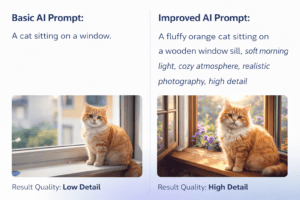
Let’s look at how structure changes results.
Basic Prompt Example
“A cat sitting on a window”
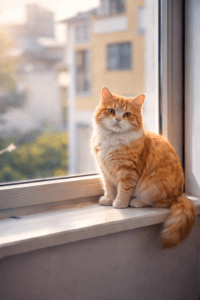
This gives you a random result with little personality.
Improved Prompt Version
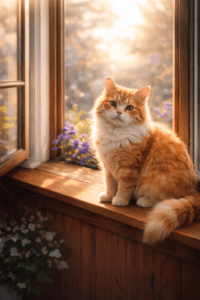
“A fluffy orange cat sitting on a wooden window sill, soft morning light, cozy atmosphere, realistic photography, high detail”
The second version provides clarity, mood, and style — which leads to a much stronger image.
Prompt Comparison Table
| Prompt Type | Result |
|---|---|
| Short & vague | Generic, low detail |
| Structured | Clear, visually rich |
AI Image Prompt Ingredients Table (Beginner Reference)
Think of a prompt like a recipe. Each ingredient improves the final result.
| Ingredient | Example |
|---|---|
| Subject | Portrait of a young woman |
| Environment | Urban street at night |
| Style | Cinematic photography |
| Lighting | Neon lights, soft shadows |
| Quality | Ultra-detailed, high resolution |
Use this table as a checklist every time you write a prompt.
Best AI Image Prompt Styles for Beginners
If you’re just starting, some styles are easier to control than others.
Beginner-Friendly Styles to Try
- Realistic photography
- Digital illustration
- Cinematic portraits
- Minimalist design
- Anime-inspired art
Starting with these styles helps you learn how prompts influence results without overwhelming complexity.
How to Improve AI Image Prompts Step by Step
Once you understand the basics, small improvements make a big difference.
Use Specific Adjectives
Replace generic words with descriptive ones:
- Instead of nice: warm, soft, dramatic
- Instead of cool: futuristic, cyberpunk, neon-lit
Add Camera and Technical Details
For realistic images, technical terms help:
- 35mm or 50mm lens
- Shallow depth of field
- Natural light or studio lighting
These details guide the AI toward more realistic compositions.
Tools That Help You Write Better AI Image Prompts
You don’t have to work alone. Several tools can help you refine your prompts.
Useful Tools for Beginners
- AI chat tools for prompt refinement
- Prompt libraries for inspiration
- Community galleries to analyze successful prompts
Studying existing prompts is one of the fastest ways to improve.
FAQ: AI Image Prompts for Beginners
What are AI image prompts for beginners?
They are simple, structured text instructions designed to help new users generate accurate and high-quality AI images without advanced knowledge.
How long should AI image prompts for beginners be?
There is no fixed length, but most effective prompts are one or two detailed sentences rather than a single phrase.
Can beginners reuse the same prompt on different AI tools?
Yes, but results may vary. Each AI model interprets prompts slightly differently, so small adjustments are often needed.
Why do AI image prompts for beginners sometimes fail?
Prompts usually fail because they lack clarity, contain vague language, or miss key visual details like style or lighting.
Conclusion: Start Creating Better AI Images Today
Learning how to write AI image prompts for beginners is not about memorizing rules — it’s about learning how to describe what you see in your mind. When you focus on structure, clarity, and detail, your results improve fast.
You don’t need to be an artist or a technical expert. You just need practice and a repeatable framework.
Your Next Step
Start today:
- Rewrite one of your old prompts using the structure from this guide
- Compare the results
- Save prompts that work and refine them
👉 The more you experiment, the better your prompts become.
If this guide helped you, bookmark it, share it, and start building your own prompt library.