How to Master Grain and Halation for Authentic Analog Emotion
90s Film Portrait AI Prompt: How to Master Grain and Halation for Authentic Analog Emotion
There’s a reason 90s film portraits still hit differently. When you look at an old family photo, a magazine cover, or a candid portrait from that era, you don’t just see a face — you feel a moment. The softness, the glow, the slight imperfections all work together to create emotion. Today, with AI image generation, you can recreate that same feeling, but only if you understand two essential elements: grain and halation.
If your AI portraits feel too clean, too sharp, or emotionally flat, this guide is for you. By the end of this article, you’ll know exactly how to write a 90s film portrait AI prompt that captures texture, warmth, and that unmistakable analog soul.
Why 90s Film Portraits Still Matter Today
In the 1990s, photography wasn’t about perfection. Film responded to light in unpredictable ways, and those quirks became part of the story. Grain added texture. Halation softened highlights. Skin looked real, not polished.
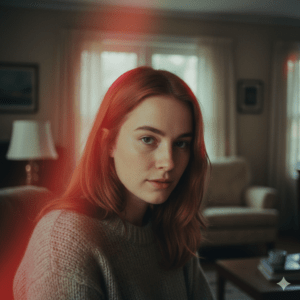
When you generate portraits with AI today, you’re often fighting against ultra-clean defaults. The goal isn’t realism in a technical sense — it’s emotional realism. That’s where 90s film aesthetics shine.
Using a well-crafted 90s film portrait AI prompt, you can guide the model away from sterile perfection and toward something that feels lived-in and human.
Understanding Film Grain in a 90s Portrait Prompt
What Film Grain Really Is
Film grain isn’t digital noise. It’s a physical texture created by light interacting with silver halide crystals in film. In portraits, grain:
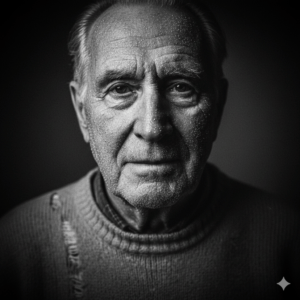
- Adds depth and softness
- Breaks overly smooth skin
- Creates a tactile, organic feel
In the 90s, grain varied depending on film stock and lighting. ISO 400 films, common for everyday portraits, produced visible but pleasing grain — especially in shadows.
How to Describe Grain in AI Prompts
When writing your prompt, avoid vague terms. Instead, be intentional. Effective grain-related keywords include:
- organic film grain
- fine analog grain
- 35mm film texture
- subtle grain in shadows
Using these terms helps the AI understand that grain is a feature, not a flaw.
Halation: The Glow That Defines Film Light
What Is Halation?
Halation happens when bright light passes through film and reflects back, creating a soft glow around highlights. In 90s portraits, you’ll often see it:
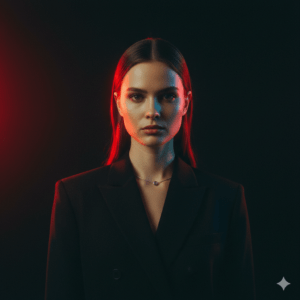
- Around hair edges
- In backlit scenes
- On bright skin highlights
This glow adds intimacy and softness, especially in close-up portraits.
Why Halation Feels Emotional
Halation reduces harsh contrast. It makes light feel forgiving. When used correctly in an AI-generated image, it creates a dream-like quality that digital sharpness can’t replicate.
Prompt Keywords for Halation
To encourage halation in your 90s film portrait AI prompt, use phrases like:
- subtle halation
- glowing highlights
- soft highlight bloom
- analog light bleed
Avoid extreme glow terms unless you want a surreal effect. Subtlety is key.
Lighting Choices That Enhance Grain and Halation
Lighting is where most AI portraits fail. If the lighting is too perfect, grain and halation won’t read correctly.
Best Lighting Styles for 90s Film Portraits
- Window light: Soft, directional, and natural
- Backlighting: Essential for halation
- Golden hour: Warm highlights and gentle contrast
- Indoor ambient light: Slight color shifts, nostalgic feel
Lighting Keywords to Use
In your prompt, try combinations such as:
- soft window light from the side
- backlit portrait with glowing edges
- low contrast film lighting
- natural light, no harsh shadows
These phrases tell the AI to prioritize mood over clarity.
Color Science: Getting the 90s Film Look Right
90s film didn’t aim for perfect color accuracy. Instead, it leaned into warmth and subtle shifts.

Typical Color Characteristics
- Warm skin tones
- Slightly muted saturation
- Cooler shadows
- Gentle contrast
Color Keywords for Your Prompt
Use descriptive language like:
- warm skin tones
- faded film colors
- pastel analog palette
- natural color shifts
Avoid modern terms like “HDR” or “hyper-saturated,” as they clash with the film aesthetic.
Camera and Lens Language That Strengthens Your Prompt
Referencing the right tools helps the AI anchor the style.
Camera Descriptions That Work
- 35mm film camera
- vintage SLR
- point-and-shoot film camera
Lens and Optical Feel
Instead of technical specs, focus on the visual outcome:
- soft focus
- slight vignette
- natural depth of field
- 50mm portrait look
These cues reinforce authenticity without overcomplicating the prompt.
Example Structure of a 90s Film Portrait AI Prompt
When you write your prompt, think in layers:
- Subject: Who is in the portrait and how they feel
- Lighting: Window light, backlight, or ambient glow
- Film style: 35mm film, analog photography
- Grain: Organic, subtle, film-based
- Halation: Soft glow around highlights
- Mood: Nostalgic, intimate, candid
This structure keeps your prompt focused and readable — for both you and the AI.
Common Mistakes to Avoid
Even small wording choices can break the illusion.
Mistakes That Ruin the 90s Film Look
- Overusing “ultra-detailed” or “8K”
- Adding too much grain until it looks noisy
- Using strong glow effects instead of subtle halation
- Mixing modern digital photography terms with film language
If your result looks off, simplify the prompt and remove anything that feels too modern.
Why Your AI Portraits Look Too Digital (And How to Fix It)
If your images still feel artificial, ask yourself:
- Did you describe the light, or just the subject?
- Did you specify film grain, or just “grain”?
- Did you guide the highlights with halation terms?
Most issues come from missing one of these elements. Fixing just one can dramatically improve results.
Frequently Asked Questions
What is the best 90s film portrait AI prompt?
The best prompt balances soft lighting, organic grain, subtle halation, and film-based color language.
How do you add halation to AI portraits?
Use backlighting and phrases like “soft highlight bloom” or “subtle halation around light.”
Can AI really recreate 90s film photography?
Yes — when you guide it with the right visual language and avoid modern digital terms.
Final Thoughts: Make Imperfection Your Advantage
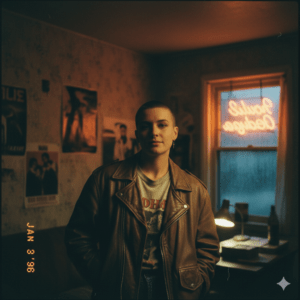
The beauty of 90s film portraits lies in what they don’t hide. Grain, halation, and softness aren’t errors — they’re emotional tools. When you embrace them in your 90s film portrait AI prompt, your images stop looking generated and start feeling remembered.
Now it’s your turn. Experiment. Tweak your prompts. Let the light bloom.
👉 Try writing your next prompt using grain and halation intentionally, and share your results. The more you explore imperfection, the closer you’ll get to true analog emotion.